How to Improve Employee Productivity in Remote Teams (2026 Guide)
Practical ways to improve employee productivity in remote teams in 2026: communication, goals, tools, onboarding and measuring results without micromanaging.
Remote work has permanently reshaped how businesses operate. According to a Gallup report, only 20% of employees worldwide are engaged at work (2025), meaning the vast majority are doing the bare minimum. For remote teams, this challenge is even more acute: without physical oversight, maintaining high productivity requires intentional systems, not just hope.
The good news? Improving remote employee productivity is entirely achievable — and when done right, remote teams consistently outperform their in-office counterparts. This guide walks you through exactly how to make that happen in 2026.
Why Remote Productivity Is Different
Before diving into strategies, it's important to understand why remote productivity requires a different playbook. Office environments rely on passive accountability — managers can see who's at their desk, who's in meetings, and who's focused. Remove that physical environment and you remove those passive signals.
Remote productivity depends on three things working together:
Structure — clear processes and expectations
Trust — psychological safety to work autonomously
Tools — technology that enables visibility without micromanagement
When any one of these breaks down, productivity suffers. Most remote team failures can be traced back to a weakness in one of these three pillars. Keep this framework in mind as you read through the strategies below.
1. Set Clear, Measurable Goals
Vague goals produce vague results. The single most impactful thing you can do for remote productivity is define exactly what "good work" looks like for every role on your team.
Use the OKR framework (Objectives and Key Results) or simple KPIs to set quarterly and weekly targets. When employees know precisely what they're working toward — and how success is measured — they self-organize around those goals far more effectively.
Practical steps:
Define 3-5 key results per employee per quarter
Break quarterly goals into weekly milestones
Review progress in brief weekly check-ins — not daily standups that feel like surveillance
Make goals visible to the whole team to encourage accountability
Clear goals also make it easier to keep people engaged. Engagement directly drives productivity.
2. Track Time Intelligently — Not Invasively
Time tracking is one of the most powerful — and most misused — tools for remote productivity. Done wrong, it destroys trust. Done right, it gives managers and employees alike the data they need to work smarter.
The key is tracking work patterns, not policing hours. WorkSnaply's time tracking captures how time is spent across projects and tasks while the timer runs, without constant screenshots (they are optional). This gives you:
Accurate data on where productive time is actually going
Early warning signs of burnout (consistent overtime, weekend work)
Project-level visibility for better resource allocation
Honest timesheets for client billing without asking employees to guess
The best time tracking setups feel invisible to employees while providing managers with meaningful insights. If your team resents your time tracking tool, it's the wrong tool.
For a deeper dive into time tracking best practices, read our guide on 10 best time tracking practices for remote teams.
3. Eliminate Meeting Overload
Meetings are the single biggest productivity killer in remote teams. A Harvard Business Review study found that executives spend an average of 23 hours per week in meetings — up from less than 10 hours in the 1960s. For remote workers, unnecessary meetings are even more disruptive because they fragment deep work time across time zones.
Audit your team's meeting load with these questions:
Could this meeting be an async update (Loom video, Slack message, written doc)?
Does every attendee actually need to be there?
Is there a clear agenda and desired outcome?
Could this be 30 minutes instead of 60?
Implement a "no meeting" block — at least 3-4 hours per day where team members can do focused, uninterrupted work. Companies like Shopify and Asana have implemented meeting-free Wednesdays with significant productivity gains.

Deep work sessions are the foundation of remote productivity. Photo: Unsplash
4. Build an Async-First Communication Culture
The most productive remote teams default to asynchronous communication — they don't expect instant replies, and they don't interrupt each other's flow with non-urgent messages. Instead, they communicate in ways that respect everyone's focused work time.
Async-first means:
Document everything — decisions, processes, and context live in written form, not people's heads
Set response time expectations — "Please respond within 4 business hours" removes anxiety without demanding immediacy
Use video for nuance — tools like Loom let you communicate complex ideas without scheduling a call
Avoid "just checking in" — every message should have a clear purpose
GitLab, one of the world's largest all-remote companies with over 2,000 employees across 65+ countries, built its entire culture around async communication. Their communication handbook is one of the most comprehensive resources on async work available.
5. Invest in the Right Tools — and Stop Investing in the Wrong Ones
Tool sprawl is a major hidden productivity killer. When a remote team uses 15 different apps that don't talk to each other, employees spend enormous time context-switching, searching for information, and re-entering data.
Audit your current tool stack:
Are there overlapping tools doing similar jobs?
Do your core tools integrate with each other?
How much time does the average employee spend managing tools vs. doing actual work?
A streamlined stack for most remote teams looks like:
Project management: Asana, Linear, or Notion
Communication: Slack (async) + Zoom (sync, minimized)
Time tracking: WorkSnaply — integrates with both
Documentation: Notion or Confluence
The goal isn't to use more tools — it's to use fewer tools better. Every integration you add between tools that don't communicate natively adds friction and error.
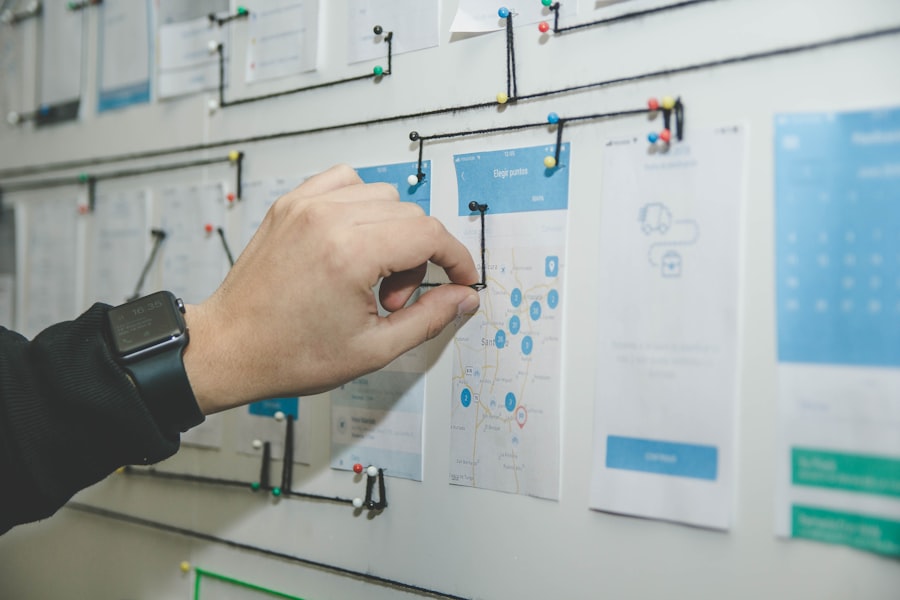
The right tools reduce friction — the wrong ones create it. Photo: Unsplash
6. Prioritize Employee Wellbeing — It Directly Impacts Output
This isn't a "nice to have" — it's a performance strategy. A World Health Organization and ILO estimate that depression and anxiety cause about 12 billion lost workdays a year, costing the global economy nearly $1 trillion. Burned-out employees aren't just unhappy — they're dramatically less productive.
Concrete wellbeing practices for remote teams:
Enforce working hours — use time tracking data to identify and address chronic overwork
Mandatory PTO — encourage (or require) employees to fully disconnect during vacation
Mental health days — normalize taking unplanned days off to recharge
Virtual social time — optional, casual connection that isn't about work
Home office stipend — ergonomic setups directly affect physical health and focus
Companies that invest in employee wellbeing see an average 4:1 return on that investment through reduced turnover, fewer sick days, and higher performance, according to research from Deloitte.
7. Create Accountability Without Micromanagement
The biggest fear managers have about remote work is that employees will slack off without oversight. The data doesn't support this fear — but the fear itself leads to micromanagement, which actively destroys productivity and trust.
The alternative is outcome-based accountability: you care about results, not activity. Here's how to implement it:
Weekly written updates — each team member shares what they accomplished, what's next, and any blockers. Takes 15 minutes to write, surfaces issues early, creates a natural record of work.
Project milestones, not daily check-ins — review progress at meaningful stages, not every 24 hours
Transparent time data — when employees can see their own productivity data in WorkSnaply, they self-manage more effectively
Trust, then verify — start from a position of trust, and use data to identify genuine performance issues rather than assuming problems
8. Onboard Remote Employees Intentionally
Poor onboarding is one of the leading causes of remote employee underperformance. When a new hire joins a remote team, they don't have the luxury of absorbing culture and context by osmosis. Every piece of knowledge they need must be deliberately shared.
A strong remote onboarding program includes:
A 30-60-90 day plan with clear milestones and success metrics
A dedicated onboarding buddy who isn't their direct manager
Documentation of all key processes, tools, and communication norms
Structured intro calls with key team members and stakeholders
Early wins — small, achievable tasks that build confidence and momentum
Research from the Glassdoor shows that strong onboarding programs improve new hire retention by 82% and productivity by over 70%. That's a massive ROI for the time invested.
9. Measure What Actually Matters
You can't improve what you don't measure — but measuring the wrong things is worse than measuring nothing. Many remote teams track activity metrics (hours logged, messages sent, tasks created) while ignoring outcome metrics (goals achieved, quality scores, client satisfaction).
Build a simple productivity dashboard that tracks:
Goal completion rate — what % of weekly goals are being hit?
Project velocity — are projects moving at the expected pace?
Time allocation — is time being spent on high-value work or administrative noise?
Overtime trends — is anyone consistently working unsustainable hours?
WorkSnaply's advanced reporting gives remote managers this visibility — project-level breakdowns and exportable reports — without manual data collection. Read our guide on how remote companies lose money without proper time tracking to understand the full cost of flying blind.
10. Build a Culture of Continuous Improvement
The most productive remote teams don't just execute — they constantly reflect and improve. They run regular retrospectives, experiment with new working methods, and share learnings across the team.
Implement a lightweight continuous improvement process:
Monthly team retrospectives — what's working, what isn't, what should we try next?
Quarterly process audits — review tools, meetings, and communication norms
Learning time — dedicate a portion of each week to skill development
Celebrate efficiency wins — recognize team members who find better ways of doing things
Teams that treat their own working methods as something to be continuously optimized consistently outperform teams that set their processes once and never revisit them.
Common Mistakes That Kill Remote Productivity
Before wrapping up, it's worth naming the most common mistakes remote managers make — because knowing what to avoid is as valuable as knowing what to do:
Treating remote work like office work — expecting the same schedules, communication styles, and accountability methods
Hiring for culture fit instead of self-direction — remote work requires a specific type of person; not everyone thrives without structure
Under-communicating — what feels like "too much" communication to managers often still feels like "not enough" to remote employees
Ignoring time zone differences — scheduling key meetings or decisions that exclude entire regions of your team
No documentation culture — when knowledge lives only in people's heads, remote teams constantly reinvent the wheel
Final Thoughts
Improving remote employee productivity isn't about monitoring more closely or working longer hours. It's about building systems that enable great work: clear goals, intelligent time tracking, async-first communication, and a culture that trusts people to deliver results.
The remote teams that consistently outperform are those that treat remote work as a genuine advantage — not a compromise. They hire for autonomy, optimize for output, and use data to support rather than surveil their teams.
Start with one or two strategies from this guide and implement them properly before moving to the next. Sustainable productivity improvements happen through consistent, well-executed changes — not overnight overhauls.
Ready to boost your remote team's productivity?
WorkSnaply gives remote managers the visibility they need — without the micromanagement their teams hate. Background time tracking, project-level insights, and reports that actually tell you something useful.
Start Free 14-Day Trial — No Credit Card Required
Related reading
- How to Track Remote Team Productivity: Tools, Metrics & Best Practices
- 7 Task Prioritization Techniques That Actually Work (2026 Guide)
- Time Management Theory: 10 Frameworks Explained & Compared
- Remote Work Best Practices: A Complete Guide for 2026
Frequently Asked Questions
How do you measure employee productivity in remote teams?
Focus on outcome metrics rather than activity metrics. Track goal completion rates, project velocity, and quality of output rather than hours online or messages sent. Tools like WorkSnaply help by showing how time is actually allocated across projects, giving managers meaningful data without surveillance.
What is the biggest challenge for remote team productivity?
The biggest challenge is maintaining alignment and accountability without the passive feedback mechanisms of an office environment. Remote teams need explicit systems for communication, goal-setting, and progress tracking that office teams can rely on informally.
Does remote work actually improve productivity?
When implemented well, yes. A Stanford study by Nicholas Bloom of call-center employees at one Chinese company found a 13% performance increase among those who worked from home. However, this requires the right systems — teams that simply moved remote without adapting their processes often see the opposite.
How much does poor productivity cost companies?
According to Gallup, low employee engagement cost the global economy about $10 trillion in lost productivity in 2024, around 9% of global GDP.