Toggl Track Reviews 2026: Honest Pros, Cons & User Ratings
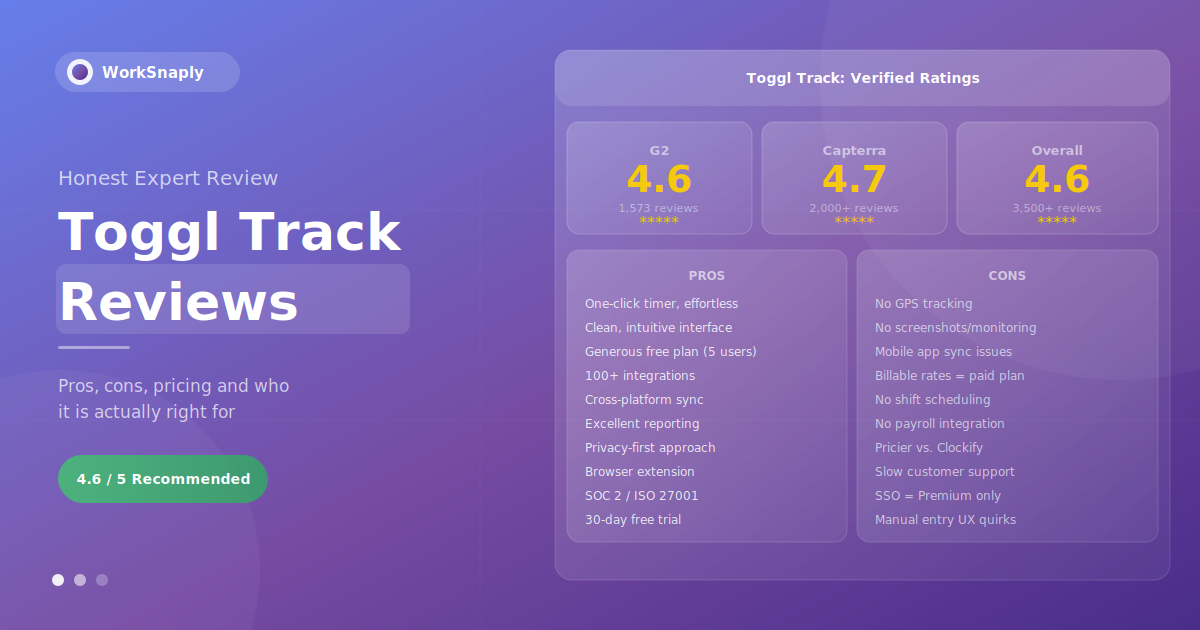
Toggl Track holds a 4.6/5 rating on G2 from 1,573 verified reviews and 4.7/5 on Capterra from over 2,000 reviews — making it one of the highest-rated time...
Toggl Track holds a 4.6/5 rating on G2 from 1,573 verified reviews and 4.7/5 on Capterra from over 2,000 reviews — making it one of the highest-rated time tracking tools on the market. But ratings alone don't tell the full story. This review synthesizes what real users say they love, what consistently frustrates them, who Toggl Track is genuinely the right fit for, and where it falls short compared to alternatives.
If you're evaluating Toggl Track for your team — or wondering whether to switch from it — this is the honest, complete picture based on verified user feedback from G2, Capterra, and Software Advice as of 2026.
Quick Verdict
Toggl Track is the best-designed, easiest-to-use time tracker for freelancers, agencies, and knowledge workers who need accurate billable hour tracking. It wins on simplicity, interface quality, and reporting. It loses on employee monitoring, GPS tracking, and price competitiveness at scale. If you don't need monitoring features, it's hard to beat.
Toggl Track Ratings: What the Numbers Say
| Platform | Overall Rating | No. of Reviews | Ease of Use | Value for Money |
|---|---|---|---|---|
| G2 | 4.6 / 5 ★ | 1,573 | 9.1 / 10 | 8.7 / 10 |
| Capterra | 4.7 / 5 ★ | 2,000+ | 4.7 / 5 | 4.6 / 5 |
| Software Advice | 4.7 / 5 ★ | 2,000+ | 4.7 / 5 | 4.5 / 5 |
Toggl Track's ratings are consistently high across all major review platforms — a sign that the positive sentiment reflects genuine user experience rather than platform-specific bias. The only notable outlier is Trustpilot, which has significantly fewer reviews and a lower score, primarily due to a smaller sample size weighted by some negative billing and customer service experiences.
What Users Love: Top Praised Features
1. Exceptional Ease of Use
Ease of use is the single most mentioned positive across all review platforms. G2 reviewers list it in 12+ separate theme mentions, more than any other category. The consensus: Toggl Track is the fastest time tracker to learn and the easiest to use daily.
The one-click start/stop timer sits at the core of this experience. Users describe opening the app, clicking one button, and immediately being back in their work — with no configuration steps, no form to fill, and no friction between the intent to track and the act of tracking.
One G2 reviewer summarized what hundreds of others said in different words: the app is fast, never crashes, and creates accountability without feeling intrusive. This balance — visible enough to be useful, invisible enough not to be annoying — is what separates Toggl Track from heavier tools in the category.
2. Interface Design
Toggl Track's interface is routinely described as the best-designed in the time tracking category. The left-hand sidebar neatly organizes features into three clear purposes — Track, Analyze, and Manage — and the onboarding checklist helps new users get set up without reading documentation.
The clean, minimal aesthetic means the interface doesn't visually compete with the work you're trying to track. Capterra reviewers specifically highlight the calendar view as a useful way to visualize how the day was spent, even if some note that weekly summaries could be more intuitive.
3. Genuinely Useful Free Plan
Unlike many SaaS tools where the free plan is barely functional, Toggl Track's free tier includes unlimited time tracking, unlimited projects and clients, basic reporting, the browser extension, cross-platform access, and integrations with 100+ tools — for up to 5 users at no cost, with no time limit.
Freelancers and small teams consistently highlight this as exceptional value. Multiple Capterra reviewers report using the free plan for years without feeling the need to upgrade. One freelance coach noted using it exclusively and finding it genuinely helpful for tracking client hours when starting out.
4. Reporting and Visibility
Toggl Track's reporting is praised specifically for being both detailed and visually clear — an unusual combination. Users describe pulling reports that show exactly where time went across projects and clients, and sharing those reports directly with clients for billing transparency.
The ability to create custom saved reports, schedule automatic email delivery to stakeholders, and export to CSV and PDF are consistently mentioned as features that make Toggl Track genuinely useful for billing workflows, not just personal time awareness.
One editorial team coordinator on Software Advice described the reporting as transforming their understanding of where team time was going — making workloads transparent and enabling better project estimation. This outcome — understanding your own time patterns — is Toggl Track's core value proposition, and the reviews consistently confirm it delivers.
5. Cross-Platform Reliability
Toggl Track runs on web, desktop (Windows, Mac, Linux), iOS, Android, and as a browser extension that works inside popular tools including Asana, GitHub, Trello, and dozens more. The ability to start a timer inside one tool and see it reflected across all other platforms in real time is frequently praised.
The browser extension in particular receives strong praise — users describe tracking time directly inside the tools they already use without switching context. One co-founder who has used Toggl Track since 2017 noted it allowed him to focus on important things rather than micromanaging, because time tracking happened naturally within existing workflows.
6. Privacy-First Philosophy
Unlike monitoring-heavy tools that capture screenshots, keystrokes, and activity levels, Toggl Track is explicitly privacy-first. There is no employee surveillance functionality — the tool tracks time and project allocation, not employee behavior.
This is both a strength and a limitation, depending on what you need. For teams that value employee trust and autonomy, it's a significant positive. Multiple G2 reviews from engineering teams specifically mention that employees appreciate Toggl Track because it respects their autonomy while giving managers the project data needed for client billing.
Toggl Track is also SOC 2 Type 1 certified and ISO 27001 compliant — making it suitable for organizations with security and compliance requirements.

What Users Dislike: Consistent Complaints
1. No Employee Monitoring Features
The most common reason users switch away from Toggl Track is the absence of monitoring features. No screenshots, no activity levels, no keystroke tracking, no application usage monitoring. For managers who need to verify that logged hours reflect actual work — particularly in high-accountability environments — Toggl Track cannot provide this.
One verified G2 reviewer noted directly: Toggl works great for solo work, but once a team scales past 10 people and needs approval flows, GPS, and shift tracking, it hits its limits fast. This is a genuine limitation, not a criticism of poor execution — it's a deliberate design choice that will be the wrong fit for certain use cases.
2. Mobile App Sync Issues
Mobile app reliability is the most consistent technical complaint across G2 and Capterra. Users report that in areas with poor connectivity, entries may not sync immediately, or may display incorrectly until the connection is restored. Switching between devices — particularly between mobile and desktop — can occasionally result in duplicate entries or timing gaps.
One Principal Sales Engineer on G2 described the specific experience of losing time gaps when switching between machines, requiring manual correction through the web interface. This issue appears more frequently in reviews from users who heavily rely on the mobile app rather than the web or desktop versions.
3. Manual Time Entry UX Problems
Adding or editing time entries manually — particularly entering start/end times rather than using the live timer — is described as unintuitive and error-prone. A leadership coach on Capterra noted that the app can auto-change dates when manually entering or altering time, creating inaccurate entries that require reconstruction.
This problem is more significant for users who track time retrospectively rather than in real time. Teams that use the live timer consistently have fewer complaints; teams that primarily fill in timesheets after the fact encounter this friction regularly.
4. Pricing Concerns at Scale
Toggl Track's pricing is mid-range compared to the category. At $9/user/month for the Starter plan (billed annually), it's more expensive than Clockify (from $3.99/user/month, billed annually) and significantly more expensive than WorkSnaply (from $3.99/user/month). For large teams, this gap compounds quickly.
The specific complaint most frequently mentioned: billable rates — one of Toggl's core selling points — require the paid Starter plan. The free plan cannot assign monetary values to tracked hours, which limits it significantly for client-billing workflows. One long-standing Capterra user described the annual requirement for billable rates as "a bit excessive."
For a complete pricing breakdown, see our dedicated guide on Toggl Track pricing plans.
5. Limited Advanced Features
G2's theme analysis shows "Limited Features" as the most commonly mentioned negative theme with 6 mentions. Specific gaps that users repeatedly cite:
- No GPS or location tracking — rules out field service, construction, and mobile workforce use cases
- No employee scheduling or shift planning — requires a separate tool for shift management
- No native payroll processing or invoicing (invoicing is described as "still in beta" by some reviewers)
- No custom reporting beyond the built-in templates on lower plans
- No calendar view for managers reviewing approvals (approvers cannot see the weekly timesheet view that employees use to enter time)
6. Slow Customer Support
Multiple reviews across platforms mention customer support response times as below expectations — even for long-standing users on paid plans. One Clockify review (which reviewed Toggl Track as part of a comparison) specifically noted that slow customer service is consistently mentioned by long-term users.
This appears most impactful for billing and account issues, where slow resolution has real financial implications. Technical support for product questions seems to be covered adequately through the documentation and community forums.
7. Recent Feature and App Changes
A notable minority of reviews — primarily from longer-term users — describe recent Toggl Track changes negatively. Specific complaints include: the Linux desktop app losing support, the dashboard becoming cluttered with upsells to premium tier features, and the overall experience feeling heavier than it used to be.
One long-term Capterra reviewer explicitly stated that Toggl Track "used to be excellent, but their recent changes made it inferior to the competitors." This represents a meaningful concern for users who valued the tool's original lightweight simplicity, though it does not appear to be the majority experience based on overall rating trends.
Feature-by-Feature Review
| Feature | Rating | User Verdict |
|---|---|---|
| Timer / Time Capture | ★★★★★ 5/5 | One-click timer is best-in-class. Fastest in category. |
| Interface / UX | ★★★★★ 5/5 | Consistently praised as cleanest in category. |
| Reporting | ★★★★☆ 4/5 | Strong standard reports. Custom reporting limited on lower plans. |
| Integrations | ★★★★☆ 4/5 | 100+ integrations. Browser extension works excellently. |
| Mobile App | ★★★☆☆ 3/5 | Sync issues and weaker UI vs. desktop. Common complaint. |
| Project Management | ★★★☆☆ 3/5 | Basic — estimates and budgets but no Gantt or dependencies. |
| Team Management | ★★★☆☆ 3/5 | Approval workflows exist but approval visibility is limited. |
| Employee Monitoring | ★☆☆☆☆ 1/5 | None by design. Privacy-first means zero monitoring features. |
| Customer Support | ★★★☆☆ 3/5 | Slow response times mentioned repeatedly. Docs are good. |
| Value for Money | ★★★★☆ 4/5 | Free plan excellent. Paid plans fair but pricier than Clockify. |
Who Toggl Track Is Right For
Based on the pattern of reviews across platforms, Toggl Track delivers the most value for:
- Freelancers and solo professionals: The free plan is genuinely sufficient for one-person operations. One-click tracking, project labels, and basic reports cover almost every freelance billing workflow.
- Agencies billing clients by the hour: Billable rate tracking, project budgets, profitability reports (Premium), and the ability to share reports directly with clients make Toggl Track a natural fit for agency billing workflows.
- Knowledge workers and remote teams: Teams that value transparency and trust over monitoring. Toggl Track gives managers project-level visibility without surveillance features that reduce employee morale.
- Small teams (2–10 people): G2 reviewers and independent analysts consistently identify this as Toggl Track's "sweet spot" — large enough to need structured tracking, small enough that the management features aren't limiting.
- Consulting and professional services: Any business that needs to accurately capture billable hours against clients and projects benefits from Toggl's combination of simple tracking and detailed reporting.
Who Toggl Track Is NOT Right For
- Field service and construction teams: No GPS tracking, no geofencing, no location verification. These are table-stakes features for mobile workforce management that Toggl Track doesn't offer.
- Managers who need employee monitoring: If you need screenshots, activity levels, application tracking, or keystroke logging to manage compliance or verify remote work, Toggl Track is the wrong tool by design.
- Large teams on tight budgets: At $9–16/user/month for paid features, Toggl Track becomes expensive for teams of 25+ compared to alternatives like Clockify (from $3.99/user/month, billed annually) or WorkSnaply (from $3.99/user).
- Teams needing scheduling: No shift management, no scheduling, no time-off calendar. A separate tool is required for these functions.
- Organizations requiring full HR integration: No payroll integration, no HR system sync, no attendance management beyond basic time tracking.

Toggl Track vs. Alternatives: How It Compares
| Feature | Toggl Track | WorkSnaply | Clockify | Hubstaff | Harvest |
|---|---|---|---|---|---|
| Starting price | $9/user/mo | $3.99/user/mo | $3.99/user/mo (annual) | $4.99/seat/mo | see Harvest's pricing |
| Free plan | ✅ Up to 5 users | 14-day trial | ✅ Unlimited users | 14-day trial | ⚠️ 1 seat, 2 projects |
| Ease of use | ★★★★★ | ★★★★★ | ★★★★☆ | ★★★☆☆ | ★★★★☆ |
| Auto time tracking | ⚠️ Background (Premium) | ✅ All plans | ⚠️ Limited | ✅ Yes | ❌ No |
| Screenshots | ❌ None | ✅ Optional | ✅ Yes | ✅ Yes | ❌ No |
| GPS tracking | ❌ No | ❌ No | ✅ Yes | ✅ Yes | ❌ No |
| Billable rates | ⚠️ Starter plan+ | ✅ All paid plans | ✅ Paid plans | ✅ Yes | ✅ Yes |
| Remote team focus | ✅ Strong | ✅ Built for it | ✅ Good | ✅ Strong | ✅ Good |
| G2 rating | 4.6 / 5 | — | 4.5 / 5 | 4.3 / 5 | 4.3 / 5 |
For a complete analysis of how Toggl Track stacks up against the full category, see our guide to the best employee time tracking software for teams in 2026.
Pricing: Is Toggl Track Worth the Cost?
Toggl Track offers four plans:
- Free: Up to 5 users, unlimited tracking, basic reports, 100+ integrations
- Starter: $9/user/month (annual) — adds billable rates, project estimates, sub-tasks
- Premium: $16/user/month (annual) — adds profitability reports, timesheet approvals, project forecasts
- Enterprise: Custom pricing — SSO, custom integrations, dedicated support
The free plan is exceptional value. The Starter plan is fairly priced for what it includes. The Premium plan at $16/user/month is where the value calculation becomes more nuanced — at this price point, alternatives like WorkSnaply (from $3.99/user) offer comparable or stronger feature sets for remote team management at significantly lower cost.
For teams whose primary need is billable hour tracking for client billing, the Starter plan delivers clear ROI — recovering even a few additional billable hours per month more than covers the $9/user cost. For teams whose primary need is remote team visibility and productivity tracking, alternatives may deliver better value. For the full pricing breakdown including the 2026 cost-by-team-size analysis, see our Toggl Track pricing guide.
Final Verdict: Should You Use Toggl Track?
Toggl Track earns its high ratings. The combination of an exceptional free plan, the best-designed interface in the category, reliable cross-platform sync, and strong billable hour reporting makes it the right choice for a specific — and large — segment of time tracking users.
The reviews are consistent and the patterns are clear. If you're a freelancer, agency, or knowledge-worker team that needs accurate time tracking without surveillance features, Toggl Track is difficult to beat at its price point. The free plan is genuinely useful; the Starter plan delivers real ROI for billing teams.
If you need GPS tracking, employee monitoring, shift scheduling, payroll integration, or are managing a large team where the per-seat cost adds up significantly — look elsewhere. The tool's limitations in these areas are deliberate design choices, not gaps in execution.
For remote teams that need productivity visibility beyond just billable hours, WorkSnaply provides a background timer and project-level reports starting at $3.99/user/month. It's built to complement or replace Toggl Track for teams where remote visibility is the priority. If you want to compare, see our full guide on time tracking best practices for remote teams.
Looking for a Toggl Track Alternative?
WorkSnaply gives remote teams a background timer, project-level reports and activity reports, starting at $3.99/user/month. Screenshots are optional, and plans start at $3.99/user/month.
Start Free 14-Day Trial — No Credit Card RequiredRelated reading
- Toggl Track Pricing: Plans, Costs & Is It Worth It?
- The Freelancer's Guide to Time Tracking: Boost Income & Reclaim Your Time
- What Is a Timesheet? Types, Benefits & Best Practices Explained
Frequently Asked Questions
Is Toggl Track worth it?
For freelancers and agencies billing clients by the hour, yes — Toggl Track delivers clear value. The free plan is genuinely sufficient for solo work, and the Starter plan's billable rate tracking pays for itself by capturing hours that would otherwise be missed. For teams needing employee monitoring, GPS tracking, or scheduling, it's not the right tool regardless of price.
What is Toggl Track's rating on G2 and Capterra?
As of 2026, Toggl Track holds a 4.6/5 rating on G2 based on 1,573 verified reviews, and 4.7/5 on Capterra from over 2,000 reviews. These are among the highest ratings in the time tracking software category. Ease of use and reporting quality are the most consistently praised aspects across both platforms.
What are the biggest complaints about Toggl Track?
The most consistent complaints from verified reviews are: mobile app sync issues (particularly when switching between devices or using the app in low-connectivity areas), the absence of GPS and employee monitoring features, manual time entry being unintuitive and error-prone, and pricing that becomes expensive at scale compared to alternatives like Clockify. Customer support response times are also mentioned negatively by multiple long-term users.
How does Toggl Track compare to Clockify?
Clockify offers a more generous free plan (unlimited users vs. Toggl's 5) and lower paid plan pricing, and includes GPS tracking and screenshot monitoring that Toggl Track doesn't offer. Toggl Track's interface is generally considered cleaner and easier to use, and its reporting is more polished. The right choice depends on whether you need monitoring features (Clockify) or prioritize interface quality and privacy-first design (Toggl Track).
Does Toggl Track work for remote teams?
Yes — Toggl Track is well-suited for remote knowledge worker teams that value employee autonomy and privacy. It provides project-level time visibility without screenshots or activity monitoring. For remote teams that need deeper productivity monitoring or background tracking, tools like WorkSnaply or Hubstaff may be more appropriate depending on the level of oversight required.
Is Toggl Track's free plan actually free?
Yes, genuinely free with no time limit for up to 5 users. The free plan includes unlimited time tracking, unlimited projects and clients, basic reporting (Summary, Detailed, and Weekly), 100+ integrations, the browser extension, and cross-platform access. The primary limitations are no billable rate tracking, no project time estimates, and no timesheet approvals — all of which require upgrading to the Starter plan.
What type of businesses use Toggl Track?
Toggl Track is most commonly used by freelancers, creative agencies, software development firms, consulting practices, law firms, and remote-first teams in knowledge work industries. It's particularly popular among teams of 1–25 users. Larger teams and field-based organizations tend to choose tools with more enterprise management features or GPS capabilities.