ActivTrak Pricing 2026: Plans, Add Ons and Hidden Costs
ActivTrak costs $10, $15 or $17 per worker per month on annual billing. See what each plan includes, which features cost extra and what 10, 25 and 50 workers cost.
Last updated: October 6, 2026. Prices checked October 2026.
ActivTrak costs $10 per worker per month for Work Activity Tracking, $15 for Workforce Management and $17 for Productivity Optimization, all billed annually. A free plan covers 3 workers. Screenshots need the Screen Details add on, AI Insights adds $4, and every paid plan button says Request quote.
Key takeaways
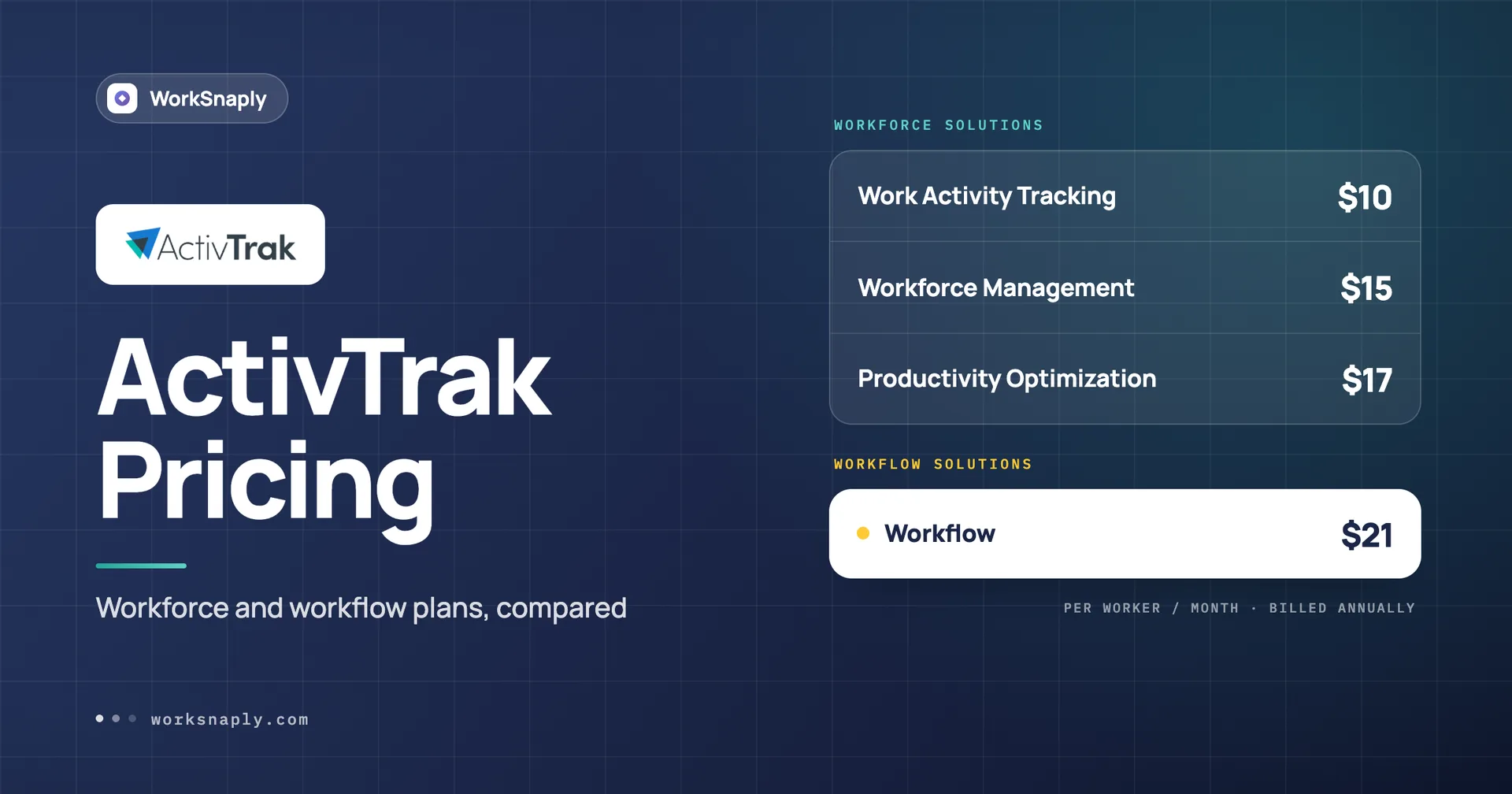
ActivTrak lists $10, $15 and $17 per worker per month on annual billing, plus a $21 Workflow line sold through a separate sales team.
The Free plan covers up to 3 workers with 30 days of data, and the 14 day trial ends by dropping you to Free.
Screenshots, live screen view and app termination come only through the Screen Details add on, and the page gives no price for it.
SSO and MFA are included on every paid plan, and data history runs 6 months, 6 months and 1 year, with a $1 add on for more.
All plans are billed on an annual contract basis, and a paid support plan is required above 50 licenses.
How much does ActivTrak cost per worker in 2026?
ActivTrak costs $10, $15 or $17 per worker per month on its three workforce plans, billed annually, with a free plan at $0 and a $21 Workflow plan on the side.
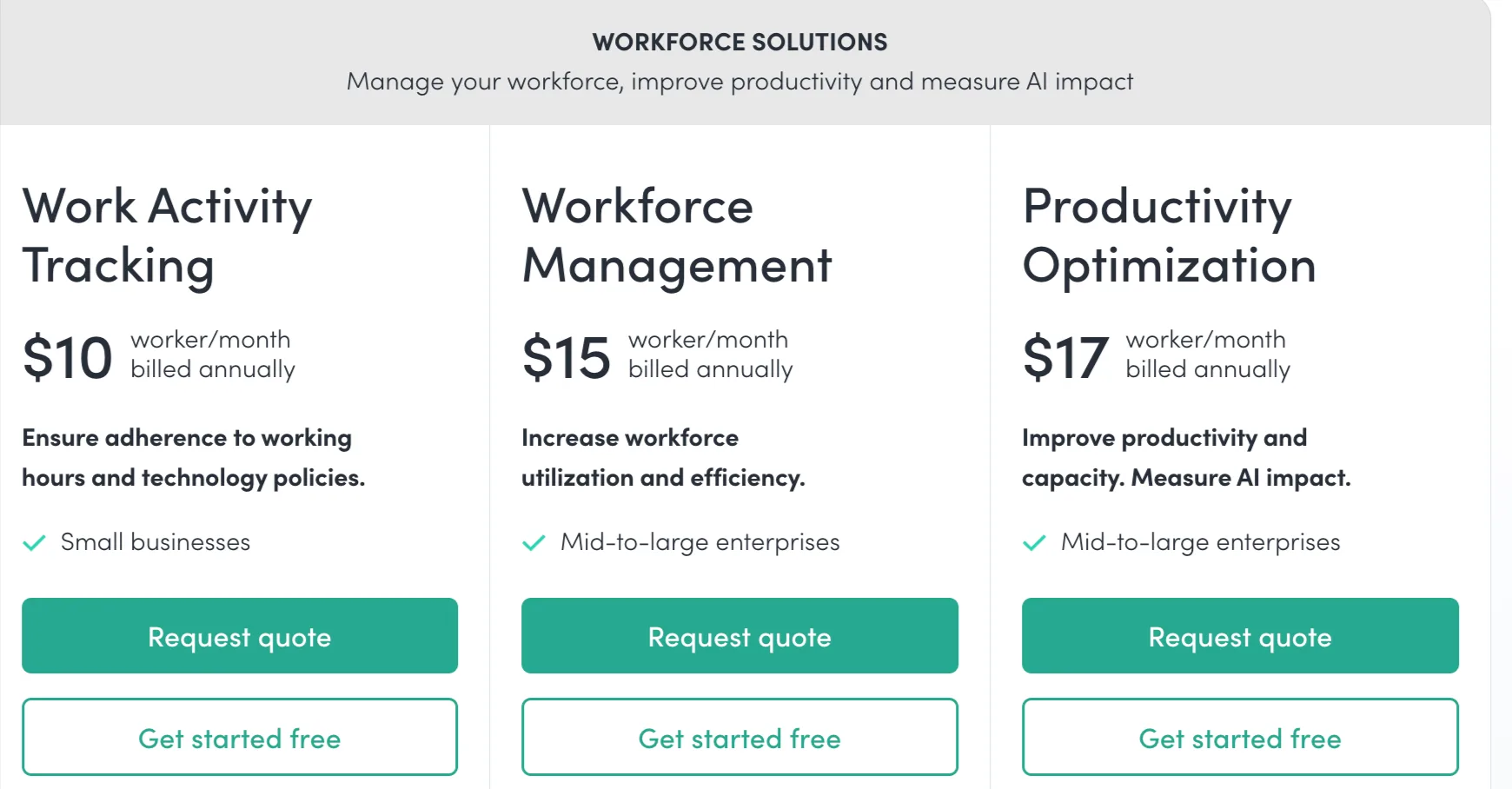
Plan | Price per worker per month | Best for, per the page | Data history |
|---|---|---|---|
Free | $0 | Basic activity visibility, 3 people | 30 days |
Work Activity Tracking | $10 | Small businesses | 6 months |
Workforce Management | $15 | Mid to large enterprises | 6 months |
Productivity Optimization | $17 | Mid to large enterprises | 1 year |
Workflow | $21 | AI, operations and transformation teams | Not listed |
Prices checked October 2026. The page shows a billed annually label and no monthly column. The three workforce plan buttons all say Request quote, and each has a Get started free button below it.
Notice what is missing. There is no monthly price and no price for the add ons that matter most.
Is ActivTrak free?
Yes, for up to 3 workers, and the free plan keeps 30 days of data and has limited application functionality.
The FAQ says the 14 day trial gives you the Workforce Management and Productivity Optimization bundle, and the Screen Details add on for selected use cases. When the trial ends, the account is downgraded to Free automatically. Free plans are restricted to 3 workers.
The Free plan also has a clock on it. If you do not log in for 30 days, the account is marked inactive and you get an email about pending deletion. Background data collection does not count as activity, so you have to log in. After that email you have 30 days to upgrade.
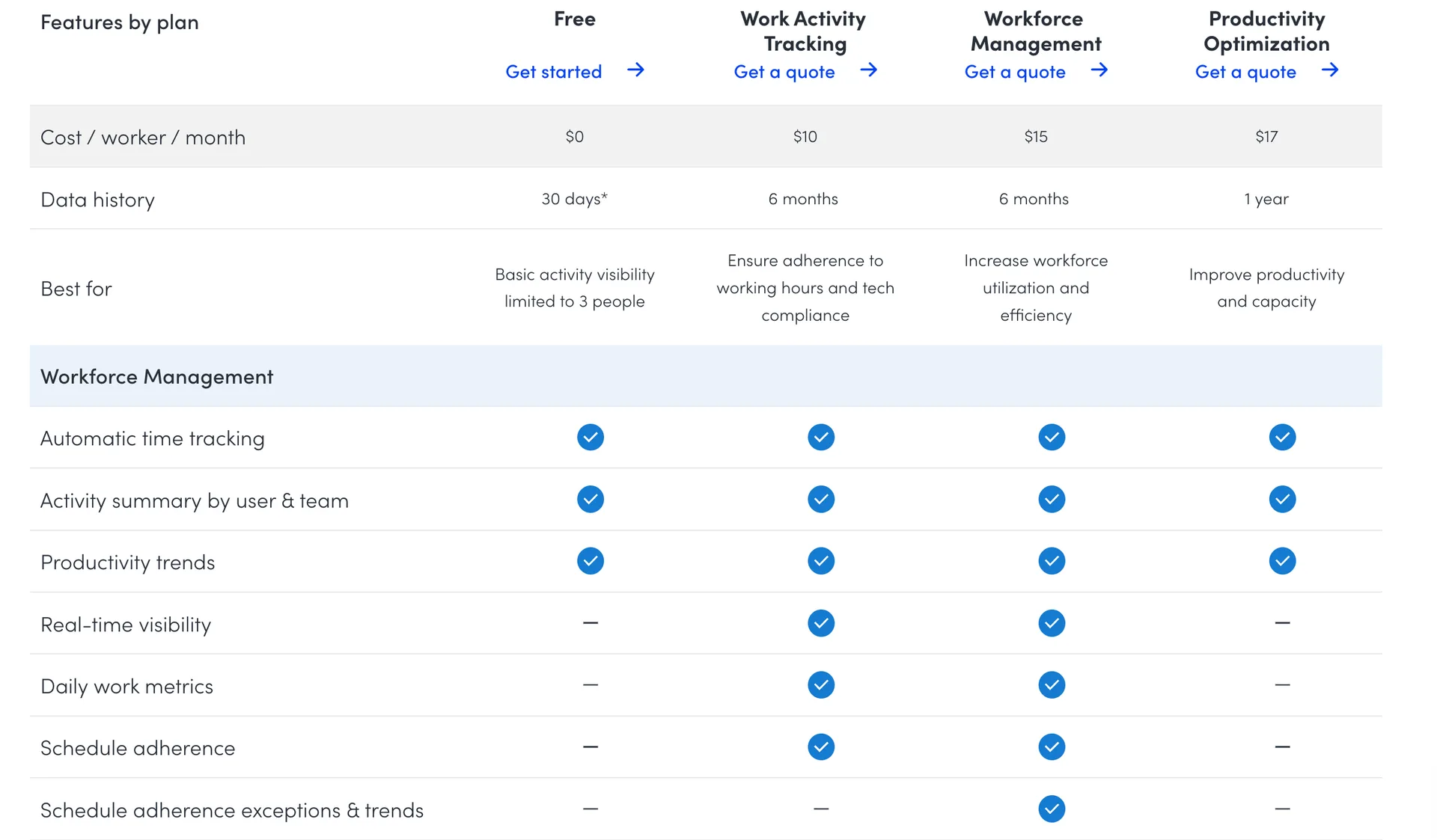
On the comparison table, Free lists activity summaries, productivity trends and website and application usage. It does not list SSO, report export or compliance alarms.
What does each paid ActivTrak plan include?
Work Activity Tracking covers time, attendance and activity, Workforce Management adds utilization and exception reporting, and Productivity Optimization adds organization wide productivity analysis.
Work Activity Tracking, $10
Automatic time tracking and real time visibility
Break time identification and attendance and schedule adherence
App and website usage and compliance alarms
Daily work metrics, offline meeting time tracking and website blocking
Workforce Management, $15
Workforce utilization and financial loss
Productivity achievement against goals
Schedule adherence exception reporting and trends
Work location policy validation and potential false activity detection
Automated email exception reporting
Work Advisor for on demand insights
Productivity Optimization, $17
Organization productivity insights and trends
Utilization and workload balance, and capacity and headcount planning
Team benchmarks and goals, and coaching opportunities
Productivity by location and technology investment analysis
Report export without a row limit
One catch on Productivity Optimization. The comparison table shows website and application usage, real time visibility and schedule adherence as not included on that plan, even though it costs the most of the three. It is a planning and analysis tier, not a superset of the cheaper plans.
Which ActivTrak features cost extra?
Screenshots, extra data history, AI Insights, API access, HRIS sync and higher support tiers are all add ons, and only two of them show a price on the page.
Add on | Price on the page | What it unlocks |
|---|---|---|
Screen Details | Not listed | Screenshots, screen views, title bars, full URLs, alarms, website blocking |
Data History | $1 per worker per month | Extra years of history, up to 3 years total |
AI Insights | $4 per worker per month | AI governance, AI adoption and AI cost views |
ActivConnect API | Not listed | API connectors, SQL access, BI starter templates |
HRIS add on | Not listed | Automatic time off sync, HRIS integration |
Premier or Signature Support | Not listed | Higher US based support tiers |
The Screen Details FAQ says the add on is available to Work Activity Tracking and Workforce Management customers, and that you can add it in the app or by emailing sales. The comparison table shows no Screen Details option on Productivity Optimization.
If screenshots are why you are shopping, ask for the Screen Details number in writing before you sign.
What will 10, 25 and 50 workers cost in a year?
On annual billing, 10 workers cost $1,200.00 on Work Activity Tracking and $2,040.00 on Productivity Optimization, and 50 workers cost $6,000.00 and $10,200.00.
Workers | Work Activity Tracking | Workforce Management | Productivity Optimization |
|---|---|---|---|
10 | $1,200.00 | $1,800.00 | $2,040.00 |
25 | $3,000.00 | $4,500.00 | $5,100.00 |
50 | $6,000.00 | $9,000.00 | $10,200.00 |
Illustrative example: the formula is workers x annual price x 12, and the counts are chosen for the math. These figures exclude Screen Details, AI Insights and any support plan.
The footnote under the comparison table says a paid support plan, Premier or Signature, is required for more than 50 licenses. A 60 worker team therefore has a cost the plan price does not show. ActivTrak does not list that support price.
How much do AI Insights and the bundle change the price?
AI Insights adds $4 per worker per month to Workforce Management or Productivity Optimization, and the bundle line promises 30 percent off when you take both of those plans.
Workers | Workforce Management | With AI Insights | Productivity Optimization | With AI Insights |
|---|---|---|---|---|
10 | $1,800.00 | $2,280.00 | $2,040.00 | $2,520.00 |
25 | $4,500.00 | $5,700.00 | $5,100.00 | $6,300.00 |
50 | $9,000.00 | $11,400.00 | $10,200.00 | $12,600.00 |
Illustrative example: workers x ($15 + $4) x 12 and workers x ($17 + $4) x 12. AI Insights raises Workforce Management by 26.7 percent and Productivity Optimization by 23.5 percent.
The bundle line reads BUNDLE AND SAVE and says Workforce Management plus Productivity Optimization saves 30 percent. The page does not print a bundle price. If the 30 percent applies to the two list prices, $32 becomes $22.40 per worker, and 10 workers would cost $2,688.00 a year instead of $3,840.00. Treat that as arithmetic and get the quote.
Productivity Optimization with AI Insights lands at $21, the same number as the Workflow plan. They are different products, so do not read that as a like for like swap.
What do security, SSO and data history look like?
SSO and MFA are included on all three paid plans, HIPAA, GDPR, CCPA and SOC 2 Type 2 are listed on every plan including Free, and data history runs from 30 days to 1 year.
That SSO line is a real strength at $10. The FAQ also says ActivTrak is a certified SOC 2 Type 2 compliant platform and that all plans include SSL encryption.
History is shorter. Work Activity Tracking and Workforce Management keep 6 months, Productivity Optimization keeps 1 year, and Free keeps 30 days. The Data History add on costs $1 per worker per month and extends total history in one year steps up to a maximum of three years. Is six months enough for the reports you run? If you compare year over year, it is not.
What are the billing and contract terms?
All ActivTrak plans are billed on an annual contract basis, and multi year contracts earn discounts.
The FAQ says to email sales for custom quotes, pricing or invoicing questions, and the page adds that multi year and volume discounts are available.
We could not verify three FAQ answers. How can I upgrade my plan, What happens if I exceed the number of licenses purchased and Do you offer monthly payment plans were collapsed in our capture. The contract answer says plans are billed annually, but check the monthly question on the live page before you plan around it.
How does ActivTrak compare with other trackers?
ActivTrak Work Activity Tracking at $10 costs $3.33 more than Time Doctor Basic and $3.61 more than WorkSnaply Professional, and both of those include screenshots.
Disclosure: We build WorkSnaply, so read this section with that in mind. Every price comes from the vendor pages listed in the Sources and fact check section.
Tool | Plan | Price, annual | Screenshots |
|---|---|---|---|
ActivTrak | Work Activity Tracking | $10 | Screen Details add on, price not listed |
Time Doctor | Basic | $6.67 | Included |
WorkSnaply | Professional | $6.39 | Included |
Illustrative example: 10 workers on ActivTrak Work Activity Tracking cost $1,200.00 a year, against $766.80 on WorkSnaply Professional before Screen Details.
For side by side reads, see Time Doctor vs ActivTrak, Clockify vs ActivTrak and ActivTrak vs Insightful. See WorkSnaply pricing for every plan.
Who should consider ActivTrak?
ActivTrak suits teams that want analytics, SSO from the first paid plan and a free tier, and are comfortable with a quote and an annual contract.
ActivTrak fits you if
You have 3 or fewer people and want a free plan
You need SSO and MFA on the cheapest paid plan
You want workforce analytics and utilization reporting
You are fine signing an annual contract
Look elsewhere if
You want a published price for screenshots
You want monthly billing
You need more than 6 months of history without an add on
Still choosing? See our roundup of the best employee monitoring software in 2026 and read about the signs an employer is monitoring work before you roll any tool out.
Related reading
Want a price you can read without a quote?
WorkSnaply Professional is $6.39 per user per month on annual billing with screenshots and activity monitoring, and every plan has a 14 day free trial with no credit card.
Start free trialFrequently Asked Questions
How much does ActivTrak cost?
Work Activity Tracking costs $10, Workforce Management $15 and Productivity Optimization $17 per worker per month, billed annually. A free plan covers 3 workers, and Workflow is listed at $21.
Does ActivTrak have a free plan?
Yes, for up to 3 workers, with 30 days of data and limited application functionality. A 14 day trial downgrades to Free when it ends.
Does ActivTrak include screenshots?
Only through the Screen Details add on on Work Activity Tracking and Workforce Management. The page gives no price for the add on.
Does ActivTrak include SSO?
Yes. SSO and MFA are included on all three paid plans and not on Free.
Can I pay for ActivTrak monthly?
The FAQ says all plans are billed on an annual contract basis. The monthly payment question was collapsed in our capture, so confirm it with ActivTrak.
How long does ActivTrak keep data?
Free keeps 30 days, Work Activity Tracking and Workforce Management keep 6 months and Productivity Optimization keeps 1 year. The Data History add on costs $1 per worker per month and extends it up to 3 years.
Fact Check
Claim | Source | Exact text from source |
|---|---|---|
ActivTrak plan prices and key features | ActivTrak pricing page, plan cards, screenshot taken October 2026 | Work Activity Tracking $10 worker/month billed annually. Small businesses. Key features: Automatic time tracking. Real time visibility. Break time identification. Attendance & schedule adherence. App & website usage. Compliance alarms. Workforce Management $15 worker/month billed annually. Mid to large enterprises. Key features: Workforce utilization & financial loss. Productivity achievement vs goals. Schedule adherence exception reporting & trends. Work location policy validation. Potential false activity detection. Add AI Insights (+$4/worker/month). Productivity Optimization $17 worker/month billed annually. Mid to large enterprises. Key features: Organization productivity insights & trends. Utilization & workload balance. Team benchmarks & goals. Capacity & headcount planning. Coaching opportunities. Technology investment analysis. Add AI Insights (+$4/worker/month). |
ActivTrak Workflow plan | ActivTrak pricing page, plan cards, screenshot taken October 2026 | Workflow $21 worker/month billed annually. Know what to improve, where AI belongs and what delivers results. AI, operations & transformation teams. Talk to Workflow sales. Includes: Work pattern & task discovery. Opportunity identification. Prioritized recommendations. AI & automation opportunities. People, process & technology insights. AI impact on capacity & performance. Post change impact measurement. |
ActivTrak bundle, AI Insights and discount lines | Work Activity Tracking $10 worker/month billed annually, Request quote. Workforce Management $15 worker/month billed annually, Request quote. Productivity Optimization $17 worker/month billed annually, Request quote. Workflow $21 worker/month billed annually, Talk to Workflow sales. Add AI Insights (+$4/worker/month) listed under Workforce Management and Productivity Optimization. BUNDLE AND SAVE! Get Workforce Management + Productivity Optimization and save 30%. Need a custom setup or enterprise plan? Multi year and volume discounts available. Need a custom setup or enterprise plan? Multi year and volume discounts available. Need pricing information on a legacy plan? | |
ActivTrak data history, Screen Details and support by plan | ActivTrak pricing page, Compare ActivTrak Workforce Plans table, screenshot taken October 2026 | Compare ActivTrak Workforce Plans, columns Free, Work Activity Tracking, Workforce Management, Productivity Optimization. Cost / worker / month: $0, $10, $15, $17. Data history: 30 days*, 6 months, 6 months, 1 year. Best for Free: Basic activity visibility limited to 3 people. Screenshots, Live screen view, App termination: via Screen Details add on on Work Activity Tracking and Workforce Management, not included on Productivity Optimization. Title bar & full url visibility (optional): via Screen Details add on on Work Activity Tracking, included on Workforce Management and Productivity Optimization. Single sign on (SSO) & MFA: not included on Free, included on all three paid plans. Report export: up to 10K rows, up to 50K rows, included. Digital Support: included on paid plans. Premier Support and Signature Support: Support add on. **Paid support plan (Premier / Signature) required for more than 50 licenses. |
ActivTrak usage, alerts and website blocking by plan | ActivTrak pricing page, Compare ActivTrak Workforce Plans table, screenshot taken October 2026 | Website & application usage, Technology category usage: included on Free, Work Activity Tracking and Workforce Management, not on Productivity Optimization. Real time visibility, Daily work metrics, Schedule adherence, Compliance alarms, Website blocking: included on Work Activity Tracking and Workforce Management, not on Productivity Optimization. |
ActivTrak SSO, security and report export | ActivTrak pricing page, Compare ActivTrak Workforce Plans table, screenshot taken October 2026 | Security, Privacy & Compliance: HIPAA, GDPR, CCPA, SOC 2 Type 2: included on all four columns. Single sign on (SSO) & MFA: not included on Free, included on Work Activity Tracking, Workforce Management and Productivity Optimization. Security audit (IT forensics): included on the three paid plans. Administration & Controls: Report export: Free none, up to 10K rows, up to 50K rows, included. Role based access controls: all four columns. |
ActivTrak HRIS, API, AI and support add ons | ActivTrak pricing page, Compare ActivTrak Workforce Plans table, screenshot taken October 2026 | Automatic time off sync from HRIS, HRIS integration: via HRIS add on on the three paid plans. ActivConnect API access, BI custom dashboards, SQL access: via ActivConnect add on. AI Insights (Add On). Premier Support and Signature Support: Support add on. |
ActivTrak Screen Details add on | How do I purchase Screen Details? The Screen Details add on is available to Work Activity Tracking and Workforce Management customers. The add on unlocks access to granular work activity data such as screenshots, screen views, title bars, full URLs and the ability to set alarms and block websites. To purchase, admins can add Screen Details to their paid plan within the ActivTrak app, via email at sales@activtrak.com or use the Chat icon below to connect with our team immediately. | |
ActivTrak Data History add on | How do I get additional data history? Accounts with a paid plan can extend their total data history to increments of one year up to a maximum of three years to enable longer term comparison and data trend analysis. The Data History add on is available for $1 per worker/month and can be purchased by contacting us. | |
ActivTrak API access and support packages | ActivConnect API is a set of API connectors and tools that enable access to your ActivTrak data in hundreds of external applications. To purchase ActivConnect, please contact sales@activtrak.com. ActivTrak offers three US based support plan tiers to suit a wide range of needs: Digital Support, Premier Support and Signature Support. | |
ActivTrak annual contract billing | Do I have to sign a long term contract? How do I cancel/delete my account? All ActivTrak plans are billed on an annual contract basis. We also offer exclusive discounts for multi year contracts. Email sales@activtrak.com to inquire about custom quotes, pricing or invoicing questions. | |
ActivTrak trial and free plan limits | How does the free trial work? The free trial gives you access to the full version of the Workforce Management + Productivity Optimization plan bundle (and Screen Details Add on for selected use cases) for 14 days. Trial plans are automatically downgraded to a Free plan at the conclusion of the trial period. Free plans are restricted to 3 workers and have limited application functionality. | |
ActivTrak free account inactivity | What happens if I stop using my free account? If you do not log in to your Free plan account for 30 days, it will be marked inactive and you'll receive an email about pending deletion. Background data collection doesn't count as activity, you must log in. After notification, you have 30 days to upgrade to a paid plan. | |
ActivTrak data security | How do I know my data is secure? ActivTrak is a certified SOC 2 Type 2 compliant platform. Your data is stored in highly secure data centers on state of the art computer servers protected by 24 hour surveillance. Our product and infrastructure is updated regularly with the latest security patches. Our network is protected by a firewall and all ActivTrak plans include SSL encryption to keep your data safe. | |
ActivTrak FAQ answers not verified | Other FAQ questions listed with answers collapsed in the screenshot: How can I upgrade my plan? What happens if I exceed the number of licenses purchased? Do you offer monthly payment plans? | |
Time Doctor prices by plan | Basic: Annual $6.67/user/month | Monthly $8.00/user/month. Standard: Annual $11.67 | Monthly $14.00. Premium: Annual $16.70 | Monthly $20.00. | |
WorkSnaply prices, features and trial | Starter $3.99 per user/month monthly, $3.19 annual, 1 user minimum. Professional $7.99 monthly, $6.39 annual, No minimum, Screenshots & activity monitoring. Enterprise $18.99 monthly, $15.19 annual, No minimum, Payroll. All plans include a 14 day free trial with no credit card required. Save 20% with annual billing on all plans. | |
Computed figures | Arithmetic on the prices listed above. Illustrative examples assume 10 seats, annual billing and a 12 month year. | Not a quote from a vendor. Formula shown in the post. |