Calculating 1,250 Hours for FMLA Eligibility: Formula, Examples & Calculator
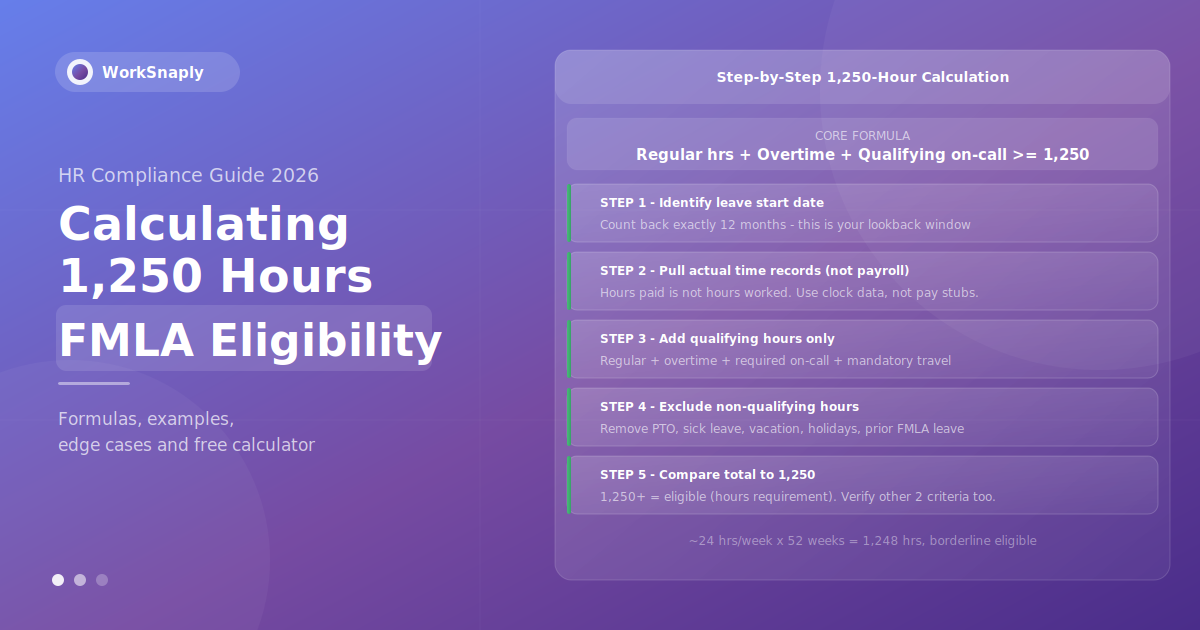
Calculating whether an employee meets FMLA's 1,250-hour threshold sounds simple on paper.
Calculating whether an employee meets FMLA's 1,250-hour threshold sounds simple on paper. In practice, it's one of the most frequently mishandled eligibility determinations in HR — because the number that appears on a payroll report is almost never the right number to use.
Hours paid and hours worked are not the same thing. That single distinction — confirmed repeatedly in federal court — is where most errors happen. An employee who received paychecks for 1,320 hours last year may have only worked 1,090 of them. The rest were vacation days, sick leave, and holidays. Under FMLA, those non-worked hours don't count.
This guide walks through the exact calculation method, the step-by-step formula, what counts and what doesn't, worked examples across different employee types, common calculation mistakes, and a free interactive calculator you can use right now.
This guide provides general educational information about FMLA calculations. It is not legal advice. For complex eligibility disputes, consult qualified employment counsel.
The Three FMLA Eligibility Requirements
The 1,250-hour threshold is one of three requirements that must all be satisfied simultaneously for FMLA leave to apply. Before running the hours calculation, confirm the other two:
- 12 months of employment with the current employer (non-consecutive months are allowed; breaks of more than 7 years generally reset the clock)
- 1,250 hours actually worked in the 12-month period immediately before leave begins
- 50+ employees within 75 miles of the employee's worksite, measured by surface roads
This guide focuses on requirement #2 — the hours calculation. But always verify all three before making an eligibility determination.
The Core Formula for Calculating FMLA Hours
FMLA Hours = (Regular hours worked) + (Overtime hours worked) + (Qualifying on-call hours) + (Required travel time) + (Mandatory training time)
Source: 29 CFR § 825.110(c) — FMLA uses FLSA standards to define "hours worked"
The benchmark: 1,250 hours over 52 weeks averages to approximately 24.04 hours per week. Any employee working at least 25 hours per week consistently for a full year will comfortably exceed the threshold. A full-time 40-hour/week employee accumulates 1,250 hours in approximately 31 weeks.
Step-by-Step Calculation Guide
Step 1: Lock Down the Leave Start Date
The 12-month lookback period runs backward from the date leave is scheduled to begin — not the date the employee submits the request. If leave starts June 15, 2026, the lookback window is June 15, 2025 through June 14, 2026.
This date-anchoring matters more than it seems. An employee who would have qualified on a different leave start date may not qualify on the actual date. Always use the scheduled start date of leave, not the request date.
Step 2: Pull Time Records — Not Payroll Records
This is where most errors originate. Pull actual time clock records, supervisor logs, or time tracking system data — not payroll summary reports. Payroll reports typically show total compensated hours, which include paid leave that does not count toward FMLA eligibility.
If your payroll system only shows total paid hours without separating worked hours from leave hours, you need to subtract all leave categories manually. This is legally necessary — as the Saulsberry v. FedEx Sixth Circuit case demonstrated: an employee had 1,257 paid hours but only 1,109 worked hours. FedEx correctly denied FMLA based on worked hours. The court upheld the denial.
Step 3: Add All Qualifying Hours
Include every category of time that qualifies under the FLSA "hours worked" standard (29 CFR § 825.110(c)):
| Hour Type | Counts? | Notes |
|---|---|---|
| Regular scheduled hours worked | ✅ Yes | All hours actually performed during scheduled shifts |
| Overtime hours | ✅ Yes | All overtime counts regardless of whether pre-approved or at premium pay |
| Required on-call hours (restricted) | ✅ Yes | Must remain on/near premises and cannot use time freely |
| Employer-required travel | ✅ Yes | Travel between job sites, mandatory business trips — not regular commute |
| Mandatory training / meetings | ✅ Yes | Required by employer — primarily for employer's benefit |
| Rest breaks under 20 minutes | ✅ Yes | Compensable under FLSA — count as hours worked |
| Pre/post-shift required activities | ✅ Yes | Equipment setup, safety checks, PPE donning before/after clocking |
| Holiday shift actually worked | ✅ Yes | Hours physically worked on a holiday count — holiday pay rate is irrelevant |
| Voluntary on-call (free to move about) | ❌ No | Employee can use time freely — not predominantly for employer's benefit |
| Vacation / PTO | ❌ No | Paid but not worked — does not count regardless of compensation |
| Sick leave | ❌ No | Does not count whether paid or unpaid |
| Paid holidays not worked | ❌ No | Compensation received but no work performed |
| Prior FMLA leave | ❌ No | FMLA leave from the lookback period does not count as hours worked |
| Shift differential / bonus pay | ❌ No | Pay rate has no effect on hour count — only actual hours matter |
| Meal breaks (30+ min, employee free) | ❌ No | Not compensable under FLSA when employee is completely relieved of duties |
Step 4: Subtract All Non-Qualifying Time
Go through each leave category in your payroll system and subtract those hours from the total. Common categories to subtract: vacation days, PTO days, personal days, sick leave, holidays not worked, bereavement leave, jury duty, military leave, and any prior FMLA leave taken in the lookback period.
Step 5: Compare to 1,250
If the resulting total is 1,250 or more, the employee meets the hours requirement. If it's below 1,250, they don't — regardless of how close they are or how many paid hours they accumulated.
Document the calculation. Retain the worksheet or payroll data used in the leave file. If the determination is ever challenged, your contemporaneous records are your primary defense.
FMLA 1,250-Hour Calculator
Enter the employee's actual worked hours to check eligibility instantly:
FMLA Hours Eligibility Calculator
Educational purposes only. Not legal advice. Always verify using certified payroll records. Consult employment counsel for borderline cases.
Worked Calculation Examples
Example 1: Full-Time Employee — Straightforward
Maria works 40 hours/week. In the 12-month lookback period she worked 49 weeks (took 3 weeks PTO).
- Regular hours: 40 × 49 = 1,960 hours
- PTO (3 weeks): does not count
- Total qualifying hours: 1,960
- Result: ✅ Eligible — exceeds 1,250 by 710 hours
Example 2: Part-Time Employee — Borderline
James works 25 hours/week. In the lookback period he worked 48 weeks (4 weeks sick leave).
- Regular hours: 25 × 48 = 1,200 hours
- Sick leave (4 weeks): does not count
- Total qualifying hours: 1,200
- Result: ❌ Not eligible — 50 hours short of 1,250
James needs approximately 2 more weeks of actual work at his current pace to meet the threshold.
Example 3: Employee With Prior FMLA Leave in Lookback
Sarah works 40 hours/week. She took 6 weeks of FMLA leave earlier in the year and 2 weeks of vacation.
- Weeks in period: 52 total − 6 (FMLA) − 2 (vacation) = 44 weeks worked
- Regular hours: 40 × 44 = 1,760 hours
- FMLA leave and vacation: do not count
- Total qualifying hours: 1,760
- Result: ✅ Eligible — exceeds 1,250
Note: Sarah's prior FMLA leave didn't hurt her eligibility here because she still worked enough weeks. But a part-time employee in the same situation could easily fall below 1,250.
Example 4: Salaried Employee With No Time Records
Tom is a salaried manager. His employer doesn't track his hours. He claims he worked well over 1,250 hours. His employer believes he did not.
Under DOL regulations, when an employer fails to maintain adequate time records, the burden shifts to the employer to disprove the employee's claimed hours. Without records, Tom's employer has a very difficult legal position. This is why maintaining time records for salaried employees — even approximate records — is strongly advisable. See our guide on timesheets and time records for implementation guidance.
Example 5: Shift Differential — The Mutchler Trap
David works in a hospital. His base schedule is 36 hours/week. He earns a "bonus" of 10 extra paid hours whenever he works a Saturday shift. In the lookback period, he worked 34 weeks (accounting for leave) and worked 8 Saturday shifts.
- Regular hours: 36 × 34 = 1,224 hours
- Saturday shifts actually worked: 8 × 8 hours = 64 hours (the actual physical hours worked on Saturdays)
- Saturday bonus pay (10 hrs × 8 shifts = 80 hrs of bonus pay): does NOT add hours
- Total qualifying hours: 1,224 + 64 = 1,288 hours
- Result: ✅ Eligible
If David had incorrectly counted the 80 bonus-pay hours as hours worked, he'd show 1,368 hours — giving the same result here. But in a case where actual hours are below 1,250, incorrectly adding bonus-pay hours could lead an employer to wrongly approve leave — exposing them to the obligation to provide leave they're not actually required to give.

7 Most Common FMLA Hours Calculation Errors
1. Using Total Paid Hours Instead of Hours Worked
The most common error. Pull hours worked from time records, not the compensation total from payroll. The Saulsberry v. FedEx case is the definitive example: the employee's "HR PAID TOT" showed 1,257 hours, his "HR WKD TOT" showed 1,109. FedEx correctly used the worked total; the Sixth Circuit upheld the denial.
2. Using the Wrong 12-Month Period
The period runs backward from the leave start date, not from today's date, not from the date the request was submitted, and not from the start of the calendar year. An off-by-a-week error can flip an eligibility determination in borderline cases.
3. Counting Bonus Pay Hours as Hours Worked
Shift differentials, weekend bonuses, and premium pay structures add compensation — they don't add hours. Only the actual physical hours worked on those shifts count. This was definitively established in Mutchler v. Dunlap Memorial Hospital (Sixth Circuit).
4. Forgetting to Exclude Prior FMLA Leave
If an employee took FMLA leave during the 12-month lookback window, those leave hours do not count as hours worked for current eligibility purposes. Many HR systems don't automatically flag this — it requires manual review.
5. Not Documenting the Calculation
An undocumented eligibility determination is almost impossible to defend. Retain the worksheet showing exactly which hours were included, which were excluded, and the resulting total. If challenged months later, you need to be able to reproduce the calculation precisely.
6. Assuming Salaried = Automatically Eligible
There is no automatic assumption that salaried employees work 1,250 hours. Their hours must be calculated the same way. If records aren't maintained, the burden of proof falls on the employer to disprove the employee's claimed hours.
7. Not Re-Verifying Intermittent Leave Annually
Employees approved for intermittent FMLA leave need to be re-verified for eligibility at the start of each FMLA leave year. An employee who was eligible last year may not be this year — particularly if they took substantial leave that reduced their working hours in the new lookback window.
Special Rule: Flight Crew Members
Flight deck crew and flight attendants have a modified eligibility standard under the FMLA (added by the Airline Flight Crew Technical Corrections Act). Instead of 1,250 hours worked, they must have:
- Worked or been paid for at least 60% of their applicable monthly guarantee for the prior 12 months, AND
- Worked or been paid for at least 504 hours during the prior 12 months (excluding commute and personal activities)
For flight crew, paid hours — including paid leave — count toward these thresholds, unlike the standard FMLA eligibility rule. This is the one meaningful exception to the "hours worked, not hours paid" principle.
The Employer's Burden of Proof
DOL regulations at 29 CFR § 825.110(c)(3) establish a critical employer obligation: if the employer does not maintain adequate time records and the employee claims they worked 1,250+ hours, the burden is on the employer to prove otherwise.
This creates an asymmetric risk. An employer with no records — or only approximate records — faces a steep uphill battle if an employee claims eligibility and the case goes to litigation. Courts have generally held that this employer failure should not disadvantage the employee whose hours weren't tracked.
The practical implication: track actual hours for every employee, including salaried staff, in a system that separates worked hours from paid leave. Automatic time tracking tools that capture activity in real time — rather than relying on employee self-reporting — produce the most defensible records. See our comparison of manual vs. automatic time tracking to understand why contemporaneous records carry more legal weight.
Employer Notice Requirements After Calculating Eligibility
Once you've completed the hours calculation and determined eligibility, federal regulations require specific notices:
- Eligibility notice: Within 5 business days of a leave request, inform the employee in writing whether they are eligible. Use DOL Form WH-381 or an equivalent notice.
- Rights and responsibilities notice: Provided simultaneously with the eligibility notice — explains what the employee must do and what protections apply.
- Designation notice: Within 5 business days of having enough information to designate the leave as FMLA-qualifying, provide written designation. Use DOL Form WH-382.
If you determine the employee is not eligible based on hours, document the calculation, provide written denial with the basis clearly stated, and retain the supporting time records. Delays in providing these notices — even when the underlying determination is correct — can themselves constitute FMLA interference.

Time Tracking Systems for FMLA Compliance
The quality of your FMLA eligibility calculations depends entirely on the quality of your time records. The minimum requirements for a defensible time tracking system:
- Separate worked hours from paid leave: The system must distinguish between hours an employee physically worked and hours they were compensated for without working
- Contemporaneous capture: Records created at the time work occurs carry more legal weight than retrospective estimates or reconstructions
- Audit trail: Any edits to time records should be logged with timestamps and user IDs
- Accessible by date range: You need to pull exact records for any 12-month window quickly and accurately
- Covers all employee types: Including salaried employees, not just hourly workers
Automatic time tracking tools that capture activity in real time — without relying on employee memory or manual entry — produce the most complete and defensible records. For a full comparison of options, see our guide to the best employee time tracking software for teams.
WorkSnaply records worked hours at the project and task level while the timer runs, with a timesheet history you can export for eligibility calculations. See WorkSnaply's time tracking features for details on compliance-focused reporting.
Accurate Time Records for FMLA Compliance
WorkSnaply records actual hours worked while the timer runs, separate from leave, so your FMLA eligibility calculations are based on tracked hours. No more manually separating worked hours from pay stubs.
Start Free 14-Day Trial — No Credit Card RequiredRelated reading
Frequently Asked Questions
How do you calculate FMLA 1,250 hours?
Add together all actual hours worked in the 12 months immediately before leave begins: regular scheduled hours worked, overtime hours, required on-call hours where movement is restricted, mandatory employer-required travel, and mandatory training time. Exclude PTO, vacation, sick leave, holidays not worked, and any prior FMLA leave taken during the period. If the total equals or exceeds 1,250, the hours requirement is met.
Does overtime count toward the 1,250 FMLA hours?
Yes. All overtime hours actually worked count toward the 1,250-hour threshold, regardless of whether they were pre-approved or compensated at a premium rate. The pay rate has no effect on whether hours count — only whether the employee was physically performing work.
Does PTO count toward the 1,250 FMLA hours?
No. Paid time off — including vacation, sick leave, personal days, and any other leave during which the employee did not actually work — does not count toward the 1,250-hour FMLA threshold. Only hours actually worked count, per the FLSA definition incorporated into FMLA regulations (29 CFR § 825.110(c)).
What is the 12-month lookback period for FMLA hours?
The 12-month lookback runs backward from the date leave is scheduled to begin — not the date the request is submitted. If leave starts on October 1, 2026, the lookback window is October 1, 2025 through September 30, 2026. Using the wrong start date — even by one week — can change an eligibility determination in borderline cases.
Do shift differentials count toward 1,250 FMLA hours?
No. Shift differentials and bonus pay do not add hours to the calculation. Only the actual physical hours worked during the shift count. An employee who works an 8-hour Saturday shift and receives 10 bonus hours of pay for it has 8 qualifying hours — not 18. This was definitively addressed in Mutchler v. Dunlap Memorial Hospital (Sixth Circuit).
Can part-time employees qualify for FMLA?
Yes — there is no full-time requirement for FMLA eligibility. A part-time employee who works 25+ hours per week consistently for 50 weeks will accumulate 1,250 qualifying hours. The threshold applies equally to part-time and full-time employees.
What happens if an employer doesn't have time records?
Under 29 CFR § 825.110(c)(3), if an employer fails to maintain adequate records of hours worked and an employee claims they worked at least 1,250 hours, the burden shifts to the employer to prove otherwise. Courts have consistently held that employers cannot use their own recordkeeping failures to deny employee FMLA rights. Maintain complete, contemporaneous time records for all employees.
Do on-call hours count toward the 1,250 FMLA threshold?
It depends on the nature of the arrangement. If the employee is required to remain at or near the workplace and cannot use the time freely for personal activities, those hours count. If the employee can be anywhere, pursue personal activities, and is only occasionally required to respond, the on-call time generally does not count. The test is whether the time is spent predominantly for the employer's benefit.