Clockify vs Hubstaff: Which Costs Less With Screenshots?
Compare Clockify and Hubstaff by price, free plan, screenshots, payroll and SSO, with seat costs worked out at 10, 25 and 50 seats.
Last updated: November 13, 2026. Prices checked October 2026.
Clockify costs less at every tier by position on annual billing, and it has a free plan for up to 5 users. Hubstaff wins only on the cheapest way to get screenshots, because Starter at $4.99 includes capped captures while Clockify screenshots start on Pro at $7.99. Hubstaff also needs two seats.
Key takeaways
Clockify Basic at $3.99 is $1.00 below Hubstaff Starter at $4.99, and the gap grows to $13.01 per seat at the Enterprise tier, $11.99 against $25.00.
Only Clockify has a free plan, up to 5 users. Hubstaff has a 14 day trial with no credit card and a 30 day money back guarantee instead.
Screenshots start on Hubstaff Starter at $4.99, capped at 500 per seat per month. On Clockify, the help center lists them on Pro at $7.99.
Clockify Standard at $5.49 covers approvals, time off, invoicing and attendance. Hubstaff Team at $10.00 is the first plan with those plus full payroll, a gap of $4.51 per seat.
SSO sits on both Enterprise plans. At 50 seats that is $7,194.00 a year on Clockify and $15,000.00 on Hubstaff.
Which is cheaper, Clockify or Hubstaff?
Clockify is cheaper at every tier when you line the plans up by position, and the gap is widest at the top.
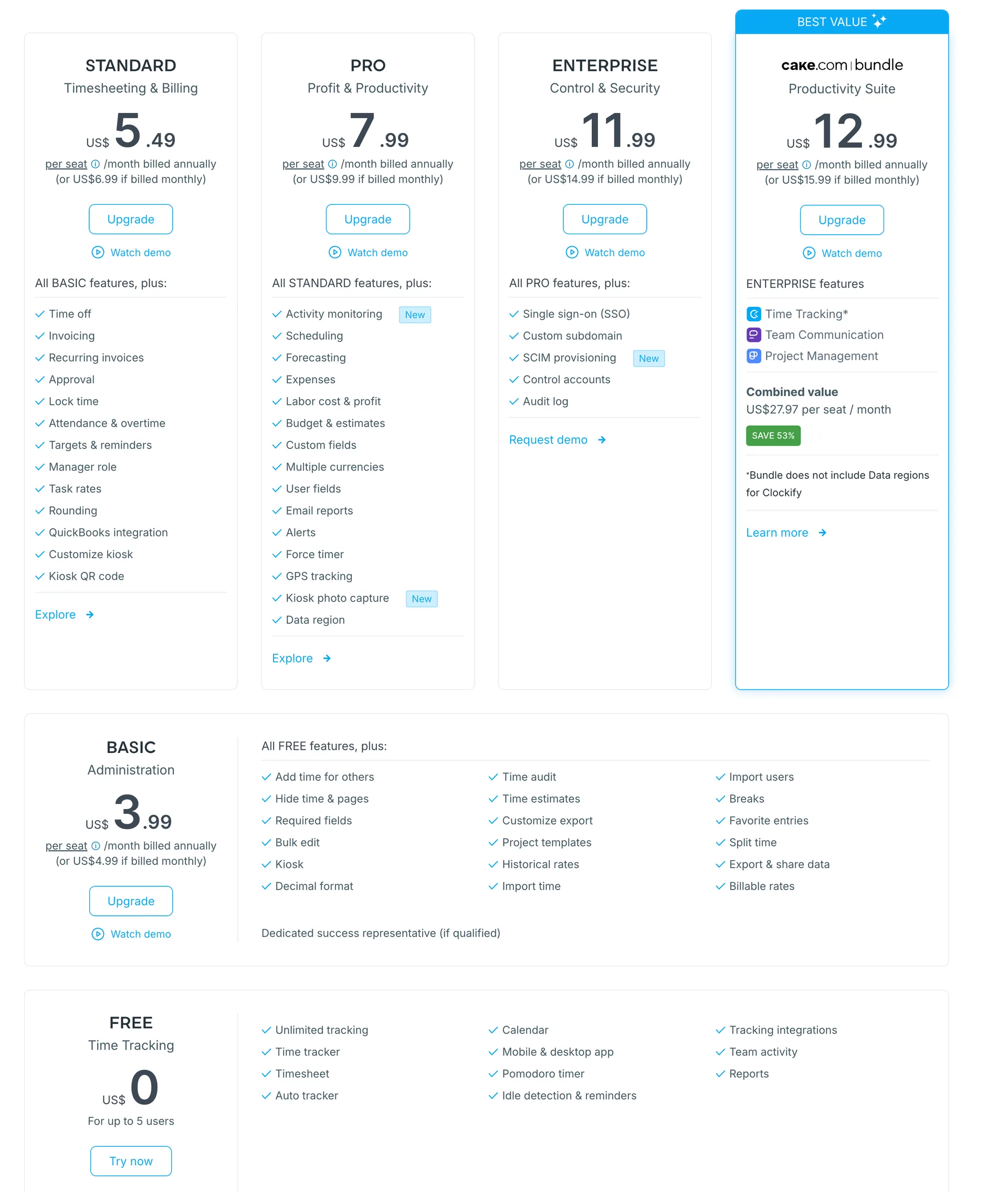
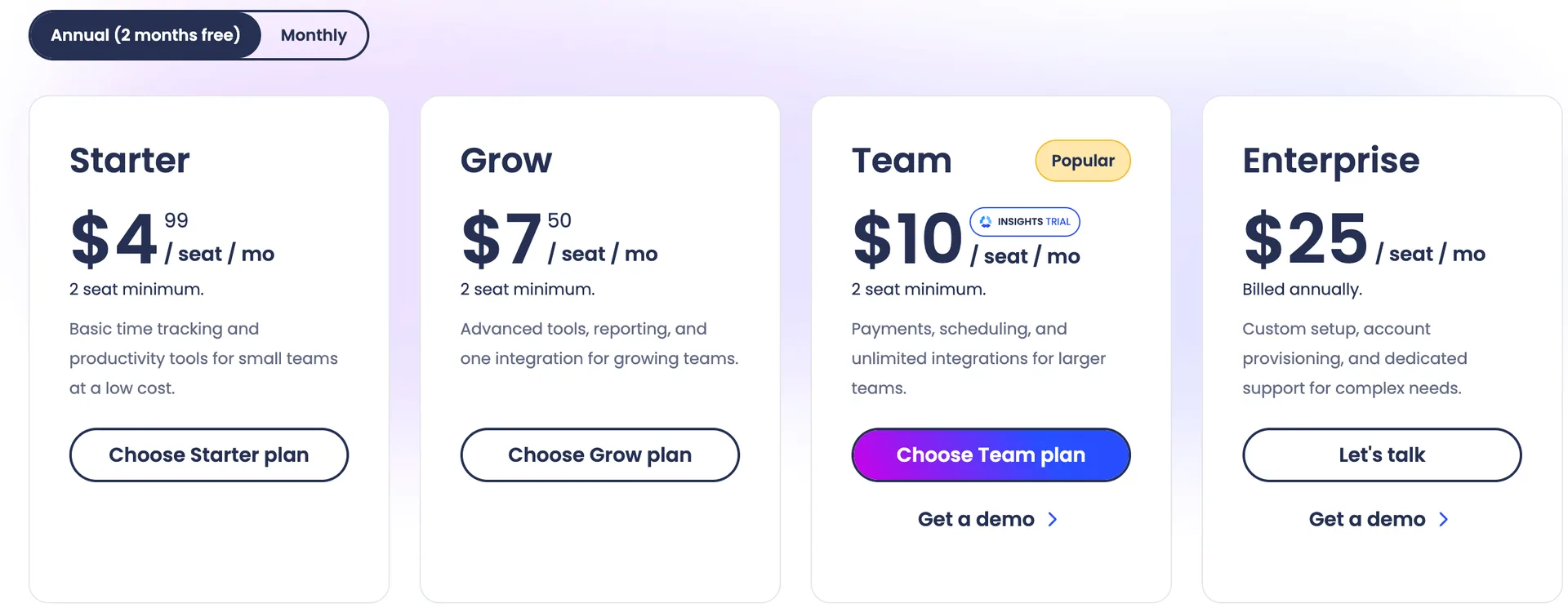
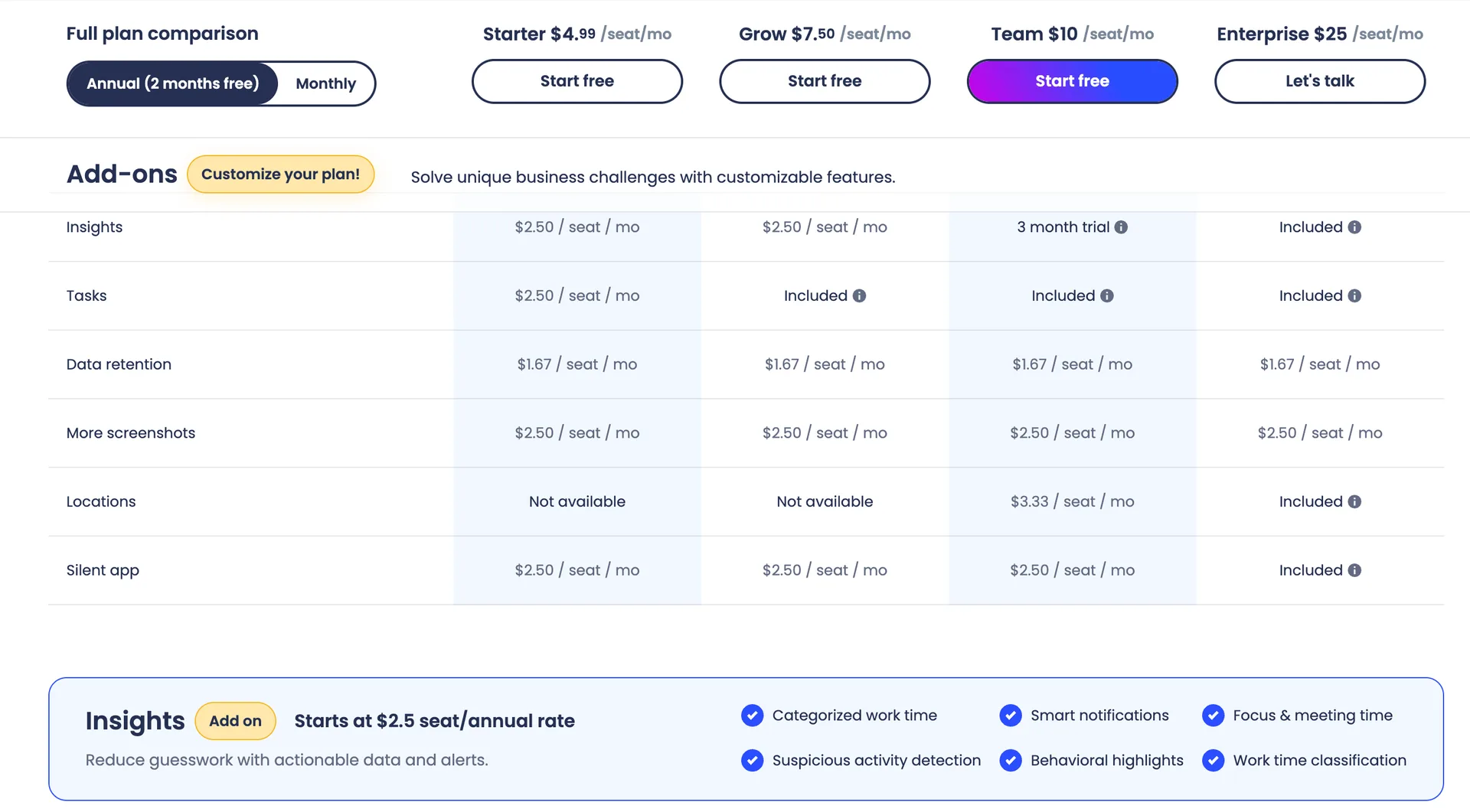
Tier | Clockify, annual | Clockify, monthly | Hubstaff, annual | Hubstaff, monthly |
|---|---|---|---|---|
Free | $0, up to 5 users | $0 | Not offered | Not offered |
Entry | $3.99 (Basic) | $4.99 | $4.99 (Starter) | $7.00 |
Middle | $5.49 (Standard) | $6.99 | $7.50 (Grow) | $9.00 |
Upper | $7.99 (Pro) | $9.99 | $10.00 (Team) | $12.00 |
Top | $11.99 (Enterprise) | $14.99 | $25.00 (Enterprise, billed annually) | $25.00 |
All prices are per seat per month. Clockify has five rows and Hubstaff has four, so the lineup by position is a rough guide. The next sections compare plans by what they include, because that is where the real gaps sit.
For the full price list of each tool, see our Clockify pricing breakdown and Hubstaff pricing breakdown.
Does Clockify or Hubstaff have a free plan?
Clockify does, for up to 5 users, and Hubstaff does not.
The Clockify free plan includes unlimited tracking, unlimited projects, PDF report exports, the API and support. Its pricing page also shows limits, such as 30 API requests per hour and up to 3 webhooks. One detail to know: the pricing page says up to 5 users, while the FAQ on the same page says you can invite up to 4 people. Test the limit during setup before you plan around it.
Hubstaff says plainly that it has no free plan. Instead you get a 14 day trial that includes all features with no credit card, and the pricing page adds a 30 day money back guarantee.
Is a free plan the right test for your team? For a team of 5 or fewer that only needs a timer and reports, it can be. If you need screenshots, it cannot be, because Clockify keeps those for paid plans.
Which plan gives you screenshots and activity monitoring?
Hubstaff Starter at $4.99 is the cheapest plan of the two with screenshots, while Clockify needs Pro at $7.99.
On Hubstaff, activity levels come with all four plans. Screenshots and app and URL tracking come with Starter too, capped at 500 per seat per month. Grow raises the cap to 1,500 and Team and Enterprise show no cap.
On Clockify, the pricing page lists Activity monitoring and GPS tracking as included on Pro and Enterprise only, and the help center lists Screenshots in its Pro features. The pricing page comparison table has no separate Screenshots row, so we rely on the help center for that point.
Illustrative example: a capture every 10 minutes gives 6 an hour, so the Starter cap of 500 lasts about 83 hours, around half of a 160 hour work month. After that you would need the More screenshots add on at $2.50 per seat or a higher plan.
Now the like for like cost. Teams that want monitoring should compare Clockify Pro with Hubstaff Grow and Hubstaff Team. Illustrative example, annual billing, formula is seats x annual price x 12.
Seats | Clockify Pro, $7.99 | Hubstaff Grow, $7.50 | Hubstaff Team, $10.00 |
|---|---|---|---|
10 | $958.80 | $900.00 | $1,200.00 |
25 | $2,397.00 | $2,250.00 | $3,000.00 |
50 | $4,794.00 | $4,500.00 | $6,000.00 |
Grow is $0.49 per seat cheaper than Clockify Pro, but it caps screenshots at 1,500 and lists payroll as Limited. Team at $10.00 has no cap and costs $2.01 more per seat than Clockify Pro, which is $1,206.00 a year at 50 seats.
If you are still deciding how much monitoring your team actually wants, read our roundup of the best employee monitoring software in 2026 first.
For the cheapest way in, the cost at the entry tier is below. Hubstaff Starter includes capped screenshots, Clockify Basic does not, so this table compares price only.
Seats | Clockify Basic, $3.99 | Hubstaff Starter, $4.99 | Hubstaff costs more by |
|---|---|---|---|
10 | $478.80 | $598.80 | $120.00 |
25 | $1,197.00 | $1,497.00 | $300.00 |
50 | $2,394.00 | $2,994.00 | $600.00 |
What do approvals, time off and payroll cost?
Clockify Standard at $5.49 covers approvals, time off and attendance, while Hubstaff needs Team at $10.00, and Team is also where Hubstaff full payroll starts.
Clockify Standard lists time off, invoicing, time approval, lock timesheets, targets and reminders, a manager role, time rounding, attendance and overtime. Scheduling, expenses, labor cost and profit and budgets come with Pro. The Clockify plan lists we checked do not name payroll.
Hubstaff Team lists timesheet approvals, scheduling and attendance, time off and holidays, overtime, work breaks and full payments and payroll. Starter and Grow list payroll as Limited.
Seats | Clockify Standard, $5.49 | Clockify Pro, $7.99 | Hubstaff Team, $10.00 | Team over Standard |
|---|---|---|---|---|
10 | $658.80 | $958.80 | $1,200.00 | $541.20 |
25 | $1,647.00 | $2,397.00 | $3,000.00 | $1,353.00 |
50 | $3,294.00 | $4,794.00 | $6,000.00 | $2,706.00 |
Illustrative example: same formula, seats x annual price x 12. At 50 seats, Hubstaff Team costs $2,706.00 a year more than Clockify Standard and $1,206.00 more than Clockify Pro. Hubstaff Team buys you uncapped screenshots and full payroll in the same plan. Do you need both, or just the approvals?
How do seat minimums, support and add ons differ?
Hubstaff requires at least two seats and sells several add ons, while the Clockify pages we checked show no seat minimum and keep most features inside the plan.
Illustrative example: one person on Hubstaff Starter pays 2 x $4.99 x 12 = $119.76 a year because of the two seat minimum. One person on Clockify Basic would pay 1 x $3.99 x 12 = $47.88 if no minimum applies. We could not find a Clockify minimum on the pages we checked, so confirm it before you buy.
Extra | Hubstaff | Clockify |
|---|---|---|
More screenshots | $2.50 annual or $3 monthly per seat | Not listed on the pricing page |
Longer data history | Data retention, $1.67 annual or $2 monthly | Not listed on the pricing page |
Location tracking | Locations, $3.33 annual or $4 monthly, on Team | GPS tracking, included on Pro |
Insights and suspicious activity | Insights, $2.50 annual or $3 monthly, 3 month trial on Team | Not listed on the pricing page |
Bundle | Not offered | CAKE.com Bundle, $12.99 annual or $15.99 monthly |
Support | Email response 2 days on Starter, 2 hours on Enterprise | Support for everyone, whatever the plan |
Prices are per seat per month unless noted. The CAKE.com Bundle adds Pumble for team communication and Plaky for project management, and the pricing page says the bundle does not include Data regions for Clockify. Hubstaff also sells VIP Support at $29 or $59 a month per organization, depending on your monthly subscription total.
If you are weighing these two against other options, our guides to Clockify alternatives and Hubstaff alternatives cover the wider field.
What does SSO cost on Clockify and Hubstaff?
SSO is an Enterprise feature on both, at $11.99 per seat on Clockify and $25.00 on Hubstaff, billed annually.
Clockify Enterprise adds single sign on, a custom subdomain, control accounts and an audit log on top of Pro. Hubstaff lists HIPAA compliance, SOC 2 Type II compliance, single sign on and SCIM user and group provisioning as Enterprise only. Hubstaff Team and Enterprise both list audit logs.
Illustrative example, formula seats x annual price x 12.
Seats | Clockify Enterprise | Hubstaff Enterprise | Hubstaff costs more by |
|---|---|---|---|
10 | $1,438.80 | $3,000.00 | $1,561.20 |
25 | $3,597.00 | $7,500.00 | $3,903.00 |
50 | $7,194.00 | $15,000.00 | $7,806.00 |
If your only reason for Enterprise is SSO, the gap is large. If you need SOC 2 Type II or HIPAA, Hubstaff lists both on Enterprise, and you should ask Clockify directly.
Where does WorkSnaply fit next to these two?
Disclosure: We build WorkSnaply, so read this section with that in mind and check our pricing page yourself.
WorkSnaply Professional is $6.39 per user per month on annual billing, which is below both Clockify Pro at $7.99 and Hubstaff Grow at $7.50. It includes screenshots and activity monitoring, and there is no seat minimum. WorkSnaply Starter at $3.19 covers time tracking, basic reports and a task planner. Enterprise at $15.19 adds client and production management and payroll.
Illustrative example, annual billing, formula seats x annual price x 12.
Seats | WorkSnaply Professional, $6.39 | Clockify Pro, $7.99 | Hubstaff Grow, $7.50 |
|---|---|---|---|
10 | $766.80 | $958.80 | $900.00 |
25 | $1,917.00 | $2,397.00 | $2,250.00 |
50 | $3,834.00 | $4,794.00 | $4,500.00 |
To be fair, WorkSnaply Enterprise at $15.19 costs more than Hubstaff Team at $10.00, so if full payroll is the only extra you need, Hubstaff Team is the cheaper route. WorkSnaply is built for office, hybrid and remote teams, with time tracking, screenshots, team reports and activity, attendance, a task planner, website and app activity tracking, invoicing and payroll. You can read how screenshots and activity monitoring work in WorkSnaply before deciding, and see the full WorkSnaply pricing.
Which one should you choose?
Choose Clockify for a free start, low per seat cost and cheap SSO, and Hubstaff for the lowest priced screenshots or full payroll in one plan.
Choose Clockify if
You have 5 or fewer people and only need a timer and reports
You need approvals, time off and attendance without paying $10.00 a seat
You want SSO without paying $25.00 a seat
You can start on Pro for screenshots and GPS
Choose Hubstaff if
You want screenshots on the cheapest paid plan and can live with 500 a month
You need full payroll, scheduling and uncapped captures on one plan, Team
You want a 30 day money back guarantee
You have two or more seats and want the add on menu
One caution on Hubstaff. The cheaper plans cap screenshots and app tracking, so price your team by the plan that removes the cap, not by the headline number.
For another head to head that starts from Clockify, read our Toggl vs Clockify comparison.
Related reading
Want a third price next to these two?
WorkSnaply Professional is $6.39 per user per month on annual billing with screenshots and activity monitoring included, and every plan has a 14 day free trial with no credit card.
Start free trialFrequently Asked Questions
Is Clockify cheaper than Hubstaff?
Yes at every tier by position on annual billing. Clockify Basic is $3.99 against $4.99 for Hubstaff Starter, Pro is $7.99 against $10.00 for Team, and Enterprise is $11.99 against $25.00. Hubstaff Starter does include capped screenshots, which Clockify Basic does not.
Does Clockify have a free plan?
Yes, for up to 5 users, though the FAQ on its pricing page says you can invite up to 4 people. Hubstaff has no free plan.
Which plan has screenshots on each tool?
Hubstaff Starter at $4.99 includes screenshots, capped at 500 per seat per month. The Clockify help center lists Screenshots in its Pro features at $7.99.
Does Hubstaff have a seat minimum?
Yes. Starter, Grow and Team each need at least 2 seats. The Clockify pricing pages we checked show no minimum, so confirm with Clockify before you buy.
Which tool has payroll?
Hubstaff lists full payments and payroll on Team at $10.00 and Limited on Starter and Grow. The Clockify plan lists we checked do not name payroll.
Which is cheaper if I need SSO?
Clockify. SSO is on Enterprise at $11.99 per seat on annual billing, against $25.00 for Hubstaff Enterprise.
Fact Check
Claim | Source | Exact text from source |
|---|---|---|
Hubstaff prices on annual and monthly billing, two seat minimum, Enterprise billed annually | Annual (2 months free): Starter $4.99 / seat / mo, 2 seat minimum. Grow $7.50 / seat / mo, 2 seat minimum. Team $10 / seat / mo, 2 seat minimum. Enterprise $25 / seat / mo, Billed annually. Monthly: Starter $7 / seat / mo, Grow $9 / seat / mo, Team $12 / seat / mo, Enterprise $25 / seat / mo, Billed annually. | |
Trial, no credit card and money back guarantee | Sign up for a free 14 day trial. No credit card required. 30 day money back guarantee. Annual (2 months free). Monthly. | |
Feature gates, payroll, support response times and compliance by plan | Idle time out: Starter none, Grow yes, Team yes, Enterprise yes. Timesheet approvals: Team and Enterprise. Scheduling & attendance, Time off & holidays, Overtime, Work breaks, Teams: Team and Enterprise. Project budgets and Expense tracking: Grow, Team, Enterprise. Integrations: Grow 1 integration. Payments & payroll: Limited, Limited, yes, yes. Audit logs: Team and Enterprise. Chat support: Team and Enterprise. Email support SLA (24x5): 2 days, 1 day, 1 day, 2 hours. HIPAA compliance, SOC 2 Type II compliance, Single sign on, SCIM user & group provisioning: Enterprise only. | |
Screenshot and app and URL caps | Screenshots: 500 / seat / mo, 1,500 / seat / mo, unlimited on Team and Enterprise. Apps & URLs tracking: 500 / seat / mo, 1,500 / seat / mo, unlimited on Team and Enterprise. | |
Add on prices and descriptions | Add ons: Insights $2.50 / seat / mo (Starter), $2.50 (Grow), 3 month trial (Team), Included (Enterprise). Tasks $2.50 (Starter), Included (Grow, Team, Enterprise). Data retention $1.67 / seat / mo on every plan. More screenshots $2.50 on every plan. Locations Not available (Starter, Grow), $3.33 (Team), Included (Enterprise). Silent app $2.50 (Starter, Grow, Team), Included (Enterprise). Optional add ons: Starts at $2.5 per seat / month. Locations starts at $3.33 per seat / month. Data retention starts at $1.67 per seat / month. More screenshots: Allow up to 10 screenshots every 10 minutes for team members. Includes all secondary monitors in use. | |
VIP Support prices | Support. VIP Support Enhanced: $29/mo per organization for orgs with monthly subscriptions between $275 $400. VIP Support The works: $59/mo per organization for orgs with monthly subscriptions above $400. Included on Enterprise. | |
No free plan and a 14 day trial | Hubstaff doesn't offer a free plan. Instead, there's a 14 day free trial that includes all features. No credit card required. | |
Standard, Pro, Enterprise and Bundle prices on the pricing page | Standard US$5.49 per seat /month billed annually (or US$6.99 if billed monthly). Pro US$7.99 per seat /month billed annually (or US$9.99 if billed monthly). Enterprise US$11.99 per seat /month billed annually (or US$14.99 if billed monthly). cake.com bundle US$12.99 per seat /month billed annually (or US$15.99 if billed monthly). Basic US$3.99 per seat /month billed annually (or US$4.99 if billed monthly). Free US$0 For up to 5 users. | |
Bundle value, discount badge and Data regions note | Time Tracking. Team Communication. Project Management. Combined value US$27.97 per seat / month. SAVE 53%. Bundle does not include Data regions for Clockify. | |
Free plan limits in the comparison table | Clockify pricing page, Compare features across plans, screenshots taken October 2026 | Unlimited users: Up to 5 users. Clockify API: 30 requests per hour. Webhooks: Up to 3 webhooks. Export & share data: PDF only. Multi year range: Up to 1 month. Project access: Public projects. Multiple currencies: not included on Free, Basic or Standard. |
The free plan FAQ says 4 people | Are there any limits in the free plan? You can track as much time as you want and invite up to 4 people for free. We also offer support to everyone, regardless of their plan. If you need additional features, you can upgrade at any time. | |
Activity monitoring and GPS start on Pro, no Screenshots row | Clockify pricing page, Compare features across plans, screenshots taken October 2026 | Productivity. Team activity. Auto tracker. Pomodoro timer. Idle detection & reminders. Activity monitoring: not included on Free, Basic or Standard, included on Pro and Enterprise. GPS tracking: not included on Free, Basic or Standard, included on Pro and Enterprise. |
Free plan features and the 5 user limit | Free plan features: Unlimited tracking. Up to 5 users. Unlimited projects. Export reports (PDF). Multiple currencies. Apps and time tracking integrations (excluding QuickBooks). Support. API. | |
Standard and Pro plan features, including screenshots, GPS and activity monitoring | Standard plan features: All BASIC features. Time off. Invoicing. Time approval. Lock timesheets. Targets & reminders. Manager role. Task rates. Time rounding. QuickBooks integration. Customize kiosk. Attendance & overtime. Pro plan features: All STANDARD features. Scheduling. Expenses. Labor cost and profit. Budget and estimates. Custom fields. User fields. Email reports. Assignment report. Alerts. Force timer. GPS tracking. Screenshots. Forecasting. Data regions. Assign currency to client. Activity monitoring. | |
Enterprise features and the bundle benefits | Enterprise plan features: All PRO features. Single sign on (SSO). Custom subdomain. Control accounts. Audit log. CAKE.com Bundle benefits include Pumble [team communication app] and Plaky [project management app]. | |
Clockify prices by plan and the CAKE.com Bundle | Basic: Annual plan $3.99 per user per month. Monthly plan $4.99 per user per month. Standard: Annual plan $5.49 per user per month. Monthly plan $6.99 per user per month. Pro: Annual plan $7.99 per user per month. Monthly plan $9.99 per user per month. Enterprise: Annual plan $11.99 per user per month. Monthly plan $14.99 per user per month. CAKE.com Bundle: Annual plan $12.99 per user per month. Monthly plan $15.99 per user per month. | |
Hubstaff screenshot cap on Starter | Starter: 500 screenshots/user/month, 500 Apps/user/month and 500 URLs/user/month. Grow: 1500 screenshots/user/month. Team: unlimited screenshots and app and URL tracking, Payments and payroll. | |
WorkSnaply prices, features and trial | Starter $3.99 per user/month monthly, $3.19 annual, 1 user minimum. Professional $7.99 monthly, $6.39 annual, No minimum, Screenshots & activity monitoring. Enterprise $18.99 monthly, $15.19 annual, No minimum, Payroll. All plans include a 14 day free trial with no credit card required. Save 20% with annual billing on all plans. | |
Computed figures | Arithmetic on the prices listed above | Not a quote from a vendor. Illustrative examples assume annual billing, a 12 month year and the seat counts shown. Formula is seats x annual price x 12. |