Hubstaff Pricing 2026: Plans, Seat Minimums and Caps
Hubstaff costs $4.99 to $12 per seat per month, with a two seat minimum and screenshot caps on lower plans. See what each plan costs for 10 to 50 seats.
Last updated: October 6, 2026. Prices checked October 2026.
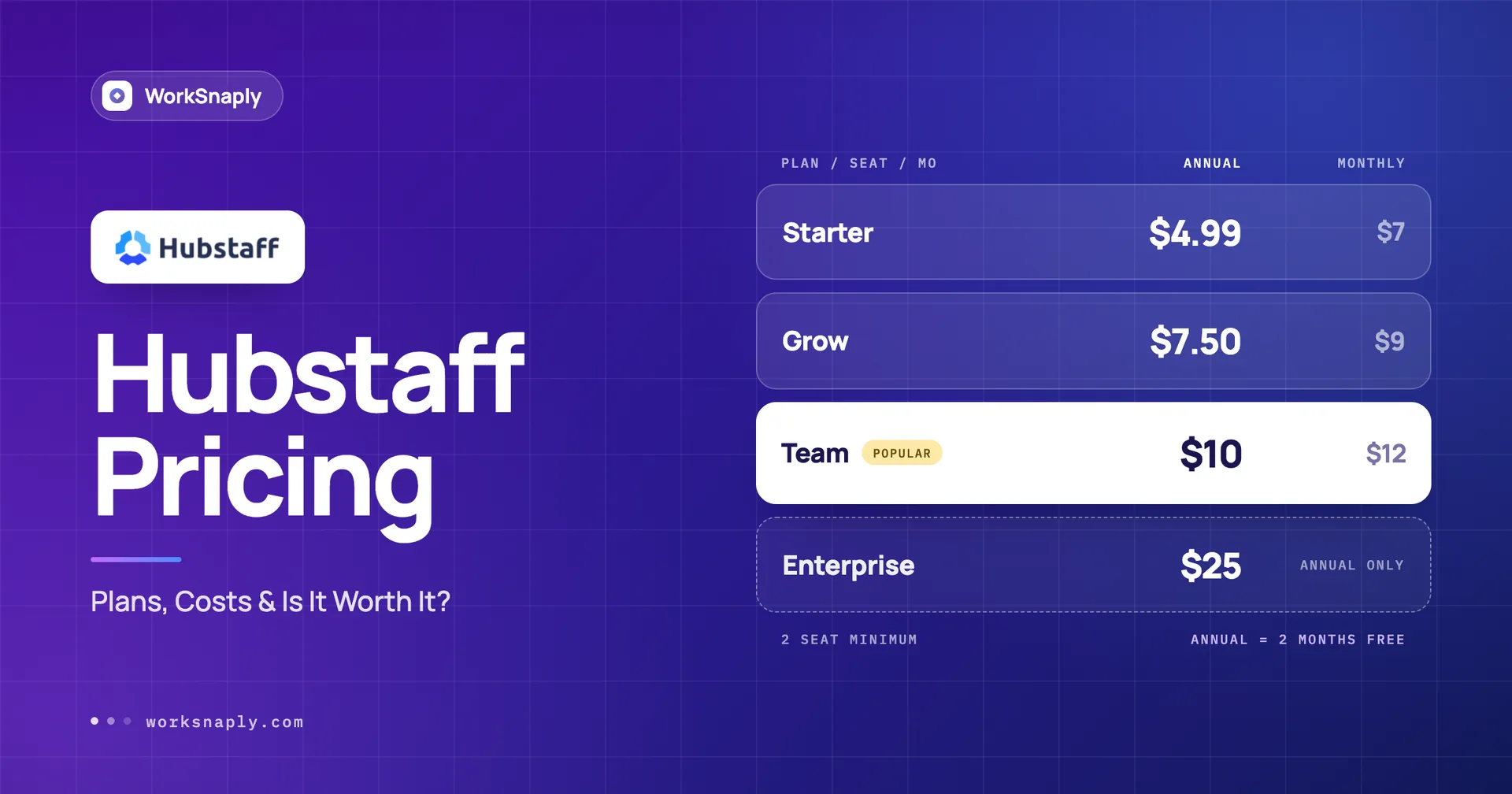
Hubstaff costs $4.99 per seat per month on Starter with annual billing, or $7 billed monthly. Grow is $7.50 annually or $9 monthly, and Team is $10 annually or $12 monthly. Enterprise is $25 per seat, billed annually. Starter, Grow and Team have a two seat minimum.
Key takeaways
Annual billing takes 28.7% off Starter but only 16.7% off Grow and Team, so Starter is where paying yearly matters most.
Starter, Grow and Team each need at least two seats, which means a solo user pays for two.
Add ons change the maths. On annual billing Starter plus a $2.50 add on is $7.49, a cent below Grow, but on monthly billing Starter plus a $3 add on is $10 against $9 for Grow.
Full payments and payroll start on Team. Starter and Grow list them as Limited.
Enterprise is $25 per seat and is billed annually even on the monthly toggle.
What does Hubstaff cost per seat in 2026?
Between $4.99 and $12 per seat per month on the three self serve plans, and $25 on Enterprise.
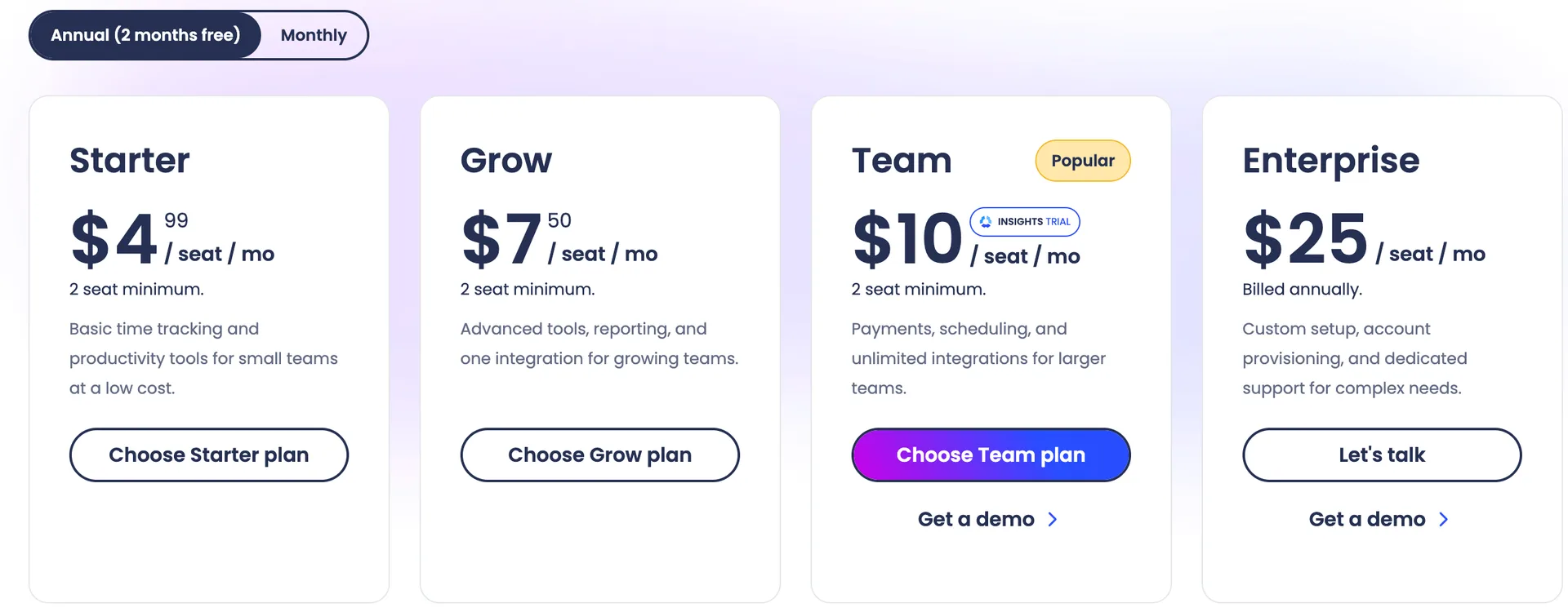
Plan | Monthly billing | Annual billing | Seat minimum | How Hubstaff describes it |
|---|---|---|---|---|
Starter | $7 | $4.99 | 2 | Basic time tracking and productivity tools for small teams at a low cost |
Grow | $9 | $7.50 | 2 | Advanced tools, reporting and one integration for growing teams |
Team | $12 | $10 | 2 | Payments, scheduling and unlimited integrations for larger teams |
Enterprise | $25, billed annually | $25, billed annually | Not shown | Custom setup, account provisioning and dedicated support for complex needs |
All prices are per seat per month, and the annual toggle on the page is labeled 2 months free. The page also offers a free 14 day trial with no credit card and a 30 day money back guarantee, which makes trying Hubstaff a lower risk move than most.
Why does annual billing matter so much on Starter?
Because the discount is not the same on every plan: 28.7% on Starter, and 16.7% on Grow and Team.
Two months free should be 16.7%, and Grow and Team match that exactly. Starter drops from $7 to $4.99, which is more than two months. Do the sums per seat and the difference is clear.
Plan | Twelve months, monthly billing | Twelve months, annual billing | Saved per seat | Discount |
|---|---|---|---|---|
Starter | $84.00 | $59.88 | $24.12 | 28.7% |
Grow | $108.00 | $90.00 | $18.00 | 16.7% |
Team | $144.00 | $120.00 | $24.00 | 16.7% |
On Starter, annual billing saves $24.12 a seat. With the trial and the money back guarantee on the same page, a year upfront is easier to defend here than with some rivals.
What changes from Starter to Enterprise?
The big gates are idle time out on Grow, approvals, scheduling, budgets by client and full payroll on Team, and security and compliance on Enterprise.
Feature | Starter | Grow | Team | Enterprise |
|---|---|---|---|---|
Idle time out | No | Yes | Yes | Yes |
Timesheet approvals | No | No | Yes | Yes |
Scheduling and attendance, time off, overtime, work breaks | No | No | Yes | Yes |
Project budgets | No | Yes | Yes | Yes |
Expense tracking | No | Yes | Yes | Yes |
Integrations | No | 1 integration | Yes | Yes |
Clients | 5 | Yes | Yes | Yes |
Tasks and to dos | 500 | 1,500 | Yes | Yes |
Client budgets | No | No | Yes | Yes |
Public API | No | No | Limited | Limited |
Payments and payroll | Limited | Limited | Yes | Yes |
Audit logs | No | No | Yes | Yes |
Chat support | No | No | Yes | Yes |
Assigned account rep and concierge set up | No | No | No | Yes |
Email support response (24x5) | 2 days | 1 day | 1 day | 2 hours |
SSO, SCIM, SOC 2 Type II and HIPAA compliance | No | No | No | Yes |
Notice the support row. Email response time goes from 2 days on Starter to 2 hours on Enterprise, and chat starts on Team. Does your team need an answer faster than a day when something breaks?
Tracking limits also climb. Starter allows 500 screenshots and 500 apps and URLs per seat per month, and Grow allows 1,500 of each. Team and Enterprise show no cap. Starter also stops at 5 clients and 500 tasks, and Grow stops at 1,500 tasks.
What do the add ons really cost?
Most add ons start at $2.50 per seat per month, so a cheap headline plan can climb quickly. The page shows one price with the annual toggle on and a higher one with the monthly toggle on, so each cell below reads annual price first, monthly price second.
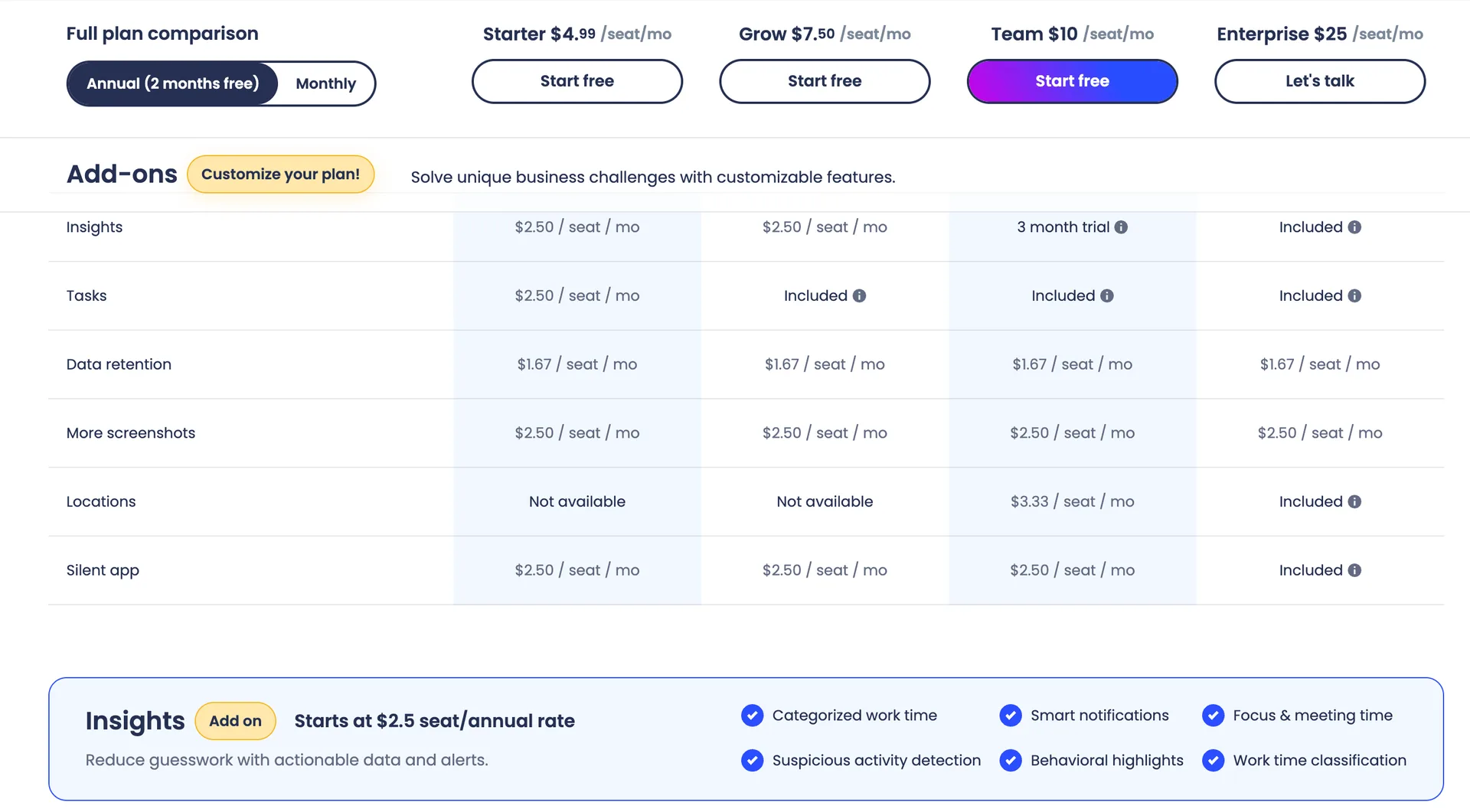
Add on, annual / monthly per seat | Starter | Grow | Team | Enterprise |
|---|---|---|---|---|
Insights | $2.50 / $3 | $2.50 / $3 | 3 month trial | Included |
Tasks | $2.50 / $3 | Included | Included | Included |
Data retention | $1.67 / $2 | $1.67 / $2 | $1.67 / $2 | $1.67 / $2 |
More screenshots | $2.50 / $3 | $2.50 / $3 | $2.50 / $3 | $2.50 / $3 |
Locations | Not available | Not available | $3.33 / $4 | Included |
Silent app | $2.50 / $3 | $2.50 / $3 | $2.50 / $3 | Included |
Here is the catch. On annual billing, Starter at $4.99 plus Insights or Tasks at $2.50 comes to $7.49, which is a cent below Grow at $7.50, and Grow already includes Tasks. On monthly billing the order flips: Starter at $7 plus Tasks at $3 is $10, which is $1 more than Grow at $9.
Illustrative example: Team at $10.00 plus Locations at $3.33 is $13.33 a seat on annual billing. Add Insights at $2.50 once the 3 month trial ends and you reach $15.83, still $9.17 below Enterprise at $25.00, though Enterprise also adds SSO, SCIM and the compliance items above. On monthly billing the same stack is $12 + $4 + $3 = $19, which is $6 below Enterprise.
There is one more cost the add on table does not show. The support section of the page lists VIP Support Enhanced at $29 a month per organization for orgs with monthly subscriptions between $275 and $400, and VIP Support The works at $59 a month per organization above $400. Illustrative example: 30 Team seats at $10.00 come to $300 a month, which falls in the first band. We could not tell from the page whether the band uses the annual rate or the monthly one, so ask Hubstaff before you budget for it.
Two add ons deserve a note. The page describes More screenshots as allowing up to 10 screenshots every 10 minutes for team members, including all secondary monitors in use. And Locations covers location tracking on mobile, job sites with geofences, work orders and jobs. Which of these would your team actually switch on?
What does the two seat minimum mean for small teams?
It means a solo user pays for two seats on Starter, Grow and Team, which is $119.76 a year on Starter with annual billing.
Illustrative example: 2 seats x $4.99 x 12 = $119.76 a year, even if only one person tracks time. WorkSnaply Starter has a 1 user minimum at $3.19 on annual billing, so one person pays 1 x $3.19 x 12 = $38.28 a year. Clockify has a free plan for up to 5 users.
None of this makes Hubstaff a bad choice for a two person team. But if you work alone, would you rather pay for two seats or one? Our guide to time tracking for freelancers covers what a one person setup needs.
How far does a screenshot cap really go?
Further than you might fear on Grow, and not far at all on Starter if your team captures often.
Illustrative example: this assumes one capture per interval and a cap counted per seat per month. Your actual capture settings decide the real number.
Capture interval | Captures per hour | Hours covered by a 500 cap (Starter) | Hours covered by a 1,500 cap (Grow) |
|---|---|---|---|
Every 10 minutes | 6 | 83.3 | 250 |
Every 5 minutes | 12 | 41.7 | 125 |
Every 3 minutes | 20 | 25 | 75 |
A full time employee works about 160 hours a month, so on Starter even a 10 minute interval runs out after about 83 hours. Do you actually need that many captures? Most teams never ask until the cap hits. If you are weighing how much monitoring is right, read our best employee monitoring software roundup first.
What will 10, 25 and 50 seats cost in a year?
On annual billing, 10 seats cost $598.80 on Starter and $1,200.00 on Team, and 50 seats cost $2,994.00 and $6,000.00, before any add ons.
Illustrative example: the formula is seats x annual price x 12, and the seat counts are chosen for the math.
Seats | Starter | Grow | Team | Enterprise |
|---|---|---|---|---|
10 | $598.80 | $900.00 | $1,200.00 | $3,000.00 |
25 | $1,497.00 | $2,250.00 | $3,000.00 | $7,500.00 |
50 | $2,994.00 | $4,500.00 | $6,000.00 | $15,000.00 |
At 50 seats the gap between Team and Grow is $1,500.00 a year. That is the price of approvals, scheduling, full payroll and unlimited caps. Is that worth it for you?
Does Hubstaff have a free plan?
The pricing page shows four paid plans and a free trial, not a free plan, but there is a conflict between two Hubstaff sources.
The Hubstaff pricing blog says it does not offer a free plan and gives a 14 day trial with all features and no credit card instead. An older Hubstaff support article still describes a one seat Free plan. We went with the pricing page and the blog, and you should check the live page before you decide.
Where does Hubstaff pricing get tricky?
In four places: the jump to Team, the add ons, the Insights trial and the Enterprise billing.
Team costs 33% more per seat than Grow ($10 against $7.50 annually, $12 against $9 monthly), and it is where payroll stops being Limited, so a team that wants full payroll pays that rate for every seat. Insights is a 3 month trial on Team, and the page marks its analytics features, such as categorized work time and suspicious activity detection, with an asterisk, so ask what they cost when the trial ends. And Enterprise costs $25 on both toggles and is billed annually either way, so there is no monthly escape.
How does Hubstaff compare with Clockify, Time Doctor and WorkSnaply?
Hubstaff Starter is cheaper than Time Doctor Basic and dearer than Clockify Basic, and Team is the cheapest plan with full payroll among the tools that list it on the plan page.
Disclosure: we build WorkSnaply, so read our row with that in mind. Every price comes from the vendor pages listed in the Fact Check table.
Tool | Cheapest paid plan, annual | Seat minimum | Payroll starts at | Free option |
|---|---|---|---|---|
Hubstaff | $4.99 (Starter) | 2 seats | Team, $10.00 (Limited on Starter and Grow) | 14 day trial, 30 day money back |
Clockify | $3.99 (Basic) | Not listed | Not listed on the plan page | Free plan, up to 5 users |
Time Doctor | $6.67 (Basic) | Not listed | Standard, $11.67 | 14 day trial, no free plan |
WorkSnaply | $3.19 (Starter) | 1 user on Starter | Enterprise, $15.19 | 14 day trial, no credit card |
Hubstaff Starter is $1.68 below Time Doctor Basic and $1.00 above Clockify Basic. If full payroll is the reason you are shopping, Hubstaff Team at $10.00 undercuts Time Doctor Standard at $11.67 and WorkSnaply Enterprise at $15.19. See the full breakdowns of Time Doctor pricing and Clockify pricing, or compare WorkSnaply pricing for your own team size.
Who should choose Hubstaff, and who should look elsewhere?
Choose it if you want approvals, scheduling and full payroll on Team at about $10 a seat, and look elsewhere if you are a solo user or want a free plan.
Hubstaff fits you if
You need approvals, scheduling and full payroll inside the tracker
You have two or more people to track
You want unlimited integrations and no caps on Team
You like a 30 day money back guarantee
Look elsewhere if
You work alone and do not want to pay for a second seat
You want a free plan
You want everything in one price with no add ons
Still comparing? Our roundup of the best employee time tracking software puts the main tools side by side.
Related reading
Need a lower starting price than Hubstaff?
WorkSnaply Starter is $3.19 per user per month on annual billing with a 1 user minimum, and every plan has a 14 day free trial with no credit card.
Start free trialFrequently Asked Questions
How much does Hubstaff cost per user?
Hubstaff costs $4.99 to $12 per seat per month on Starter, Grow and Team depending on the plan and billing, and $25 on Enterprise, which is billed annually.
Does Hubstaff have a free plan?
The pricing page shows paid plans, a free 14 day trial and a 30 day money back guarantee, not a free plan. An older support article still mentions a one seat Free plan, so check the live page.
Which Hubstaff plan includes payroll?
Full payments and payroll start on Team, at $10 per seat per month on annual billing or $12 monthly. Starter and Grow list payroll as Limited.
How much do Hubstaff add ons cost?
On annual billing, Insights, More screenshots, Tasks and Silent app start at $2.50 per seat per month, Data retention at $1.67 and Locations at $3.33. On monthly billing they are $3, $2 and $4. Some are included on higher plans.
What is the Hubstaff seat minimum?
Starter, Grow and Team each need at least two seats, so a solo user pays for two. The page does not show a minimum for Enterprise.
Does Hubstaff limit screenshots?
Yes. Starter allows 500 per seat per month and Grow allows 1,500. Team and Enterprise show no cap, and a More screenshots add on is available.
Fact Check
Claim | Source | Exact text from source |
|---|---|---|
Trial, no credit card and money back guarantee | Sign up for a free 14 day trial. No credit card required. 30 day money back guarantee. Annual (2 months free). Monthly. | |
Hubstaff prices on annual and monthly billing, two seat minimum, Enterprise billed annually | Annual (2 months free): Starter $4.99 / seat / mo, 2 seat minimum. Grow $7.50 / seat / mo, 2 seat minimum. Team $10 / seat / mo, 2 seat minimum. Enterprise $25 / seat / mo, Billed annually. Monthly: Starter $7 / seat / mo, Grow $9 / seat / mo, Team $12 / seat / mo, Enterprise $25 / seat / mo, Billed annually. | |
Plan descriptions, Popular label and Insights Trial badge | Starter $4.99 / seat / mo, 2 seat minimum. Basic time tracking and productivity tools for small teams at a low cost. Grow $7.50 / seat / mo, 2 seat minimum. Advanced tools, reporting, and one integration for growing teams. Team $10 / seat / mo, 2 seat minimum, Popular, Insights Trial. Payments, scheduling, and unlimited integrations for larger teams. Enterprise $25 / seat / mo, Billed annually. Custom setup, account provisioning, and dedicated support for complex needs. | |
Feature gates, payroll, support response times and compliance by plan | Idle time out: Starter none, Grow yes, Team yes, Enterprise yes. Timesheet approvals: Team and Enterprise. Scheduling & attendance, Time off & holidays, Overtime, Work breaks, Teams: Team and Enterprise. Project budgets and Expense tracking: Grow, Team, Enterprise. Integrations: Grow 1 integration. Payments & payroll: Limited, Limited, yes, yes. Audit logs: Team and Enterprise. Chat support: Team and Enterprise. Email support SLA (24x5): 2 days, 1 day, 1 day, 2 hours. HIPAA compliance, SOC 2 Type II compliance, Single sign on, SCIM user & group provisioning: Enterprise only. | |
Screenshot and app and URL caps | Screenshots: 500 / seat / mo, 1,500 / seat / mo, unlimited on Team and Enterprise. Apps & URLs tracking: 500 / seat / mo, 1,500 / seat / mo, unlimited on Team and Enterprise. | |
Add on prices and descriptions | Add ons: Insights $2.50 / seat / mo (Starter), $2.50 (Grow), 3 month trial (Team), Included (Enterprise). Tasks $2.50 (Starter), Included (Grow, Team, Enterprise). Data retention $1.67 / seat / mo on every plan. More screenshots $2.50 on every plan. Locations Not available (Starter, Grow), $3.33 (Team), Included (Enterprise). Silent app $2.50 (Starter, Grow, Team), Included (Enterprise). Optional add ons: Starts at $2.5 per seat / month. Locations starts at $3.33 per seat / month. Data retention starts at $1.67 per seat / month. More screenshots: Allow up to 10 screenshots every 10 minutes for team members. Includes all secondary monitors in use. | |
Add on prices with the monthly toggle on | Monthly toggle, Add ons: Insights $3 / seat / mo (Starter), $3 (Grow), 3 month trial (Team), Included (Enterprise). Tasks $3 (Starter), Included (Grow, Team, Enterprise). Data retention $2 / seat / mo on every plan. More screenshots $3 on every plan. Locations Not available (Starter, Grow), $4 (Team), Included (Enterprise). Silent app $3 (Starter, Grow, Team), Included (Enterprise). | |
VIP Support prices | Support. VIP Support Enhanced: $29/mo per organization for orgs with monthly subscriptions between $275 $400. VIP Support The works: $59/mo per organization for orgs with monthly subscriptions above $400. Included on Enterprise. | |
Client, task, API and analytics limits by plan | Clients: 5 (Starter), then ticked on Grow, Team and Enterprise. Tasks / To dos: 500 (Starter), 1,500 (Grow), ticked on Team and Enterprise. Client budgets: Team and Enterprise. Work orders & jobs: Enterprise only. Public API: Limited on Team and Enterprise. Assigned account rep and Concierge set up: Enterprise only. Categorized work time, Smart notifications, Benchmarks & trends, Employee utilization, Focus time, Meeting time, Behavioral highlights, Suspicious activity detection, Work time classification, Team leaderboard and Daily timeline are marked with an asterisk and listed on Team and Enterprise. | |
No free plan and a 14 day trial | Hubstaff doesn't offer a free plan. Instead, there's a 14 day free trial that includes all features. No credit card required. | |
Clockify prices and the free plan | FREE: Up to 5 users. BASIC: Annual $3.99/user/month, Monthly $4.99. STANDARD: Annual $5.49, Monthly $6.99. PRO: Annual $7.99, Monthly $9.99. ENTERPRISE: Annual $11.99, Monthly $14.99. | |
Time Doctor prices | Basic: Annual $6.67/user/month | Monthly $8.00/user/month. Standard: Annual $11.67 | Monthly $14.00. Premium: Annual $16.70 | Monthly $20.00. | |
WorkSnaply prices, minimums, features and trial | Starter $3.99 per user/month monthly, $3.19 annual, 1 user minimum. Professional $7.99 monthly, $6.39 annual, No minimum, Screenshots & activity monitoring. Enterprise $18.99 monthly, $15.19 annual, No minimum, Payroll. All plans include a 14 day free trial with no credit card required. Save 20% with annual billing on all plans. | |
Computed figures | Arithmetic on the prices listed above. Illustrative examples assume 10 seats, annual billing and a 12 month year. | Not a quote from a vendor. Formula shown in the post. |