Clockify Pricing 2026: Free Plan and Paid Tiers Explained
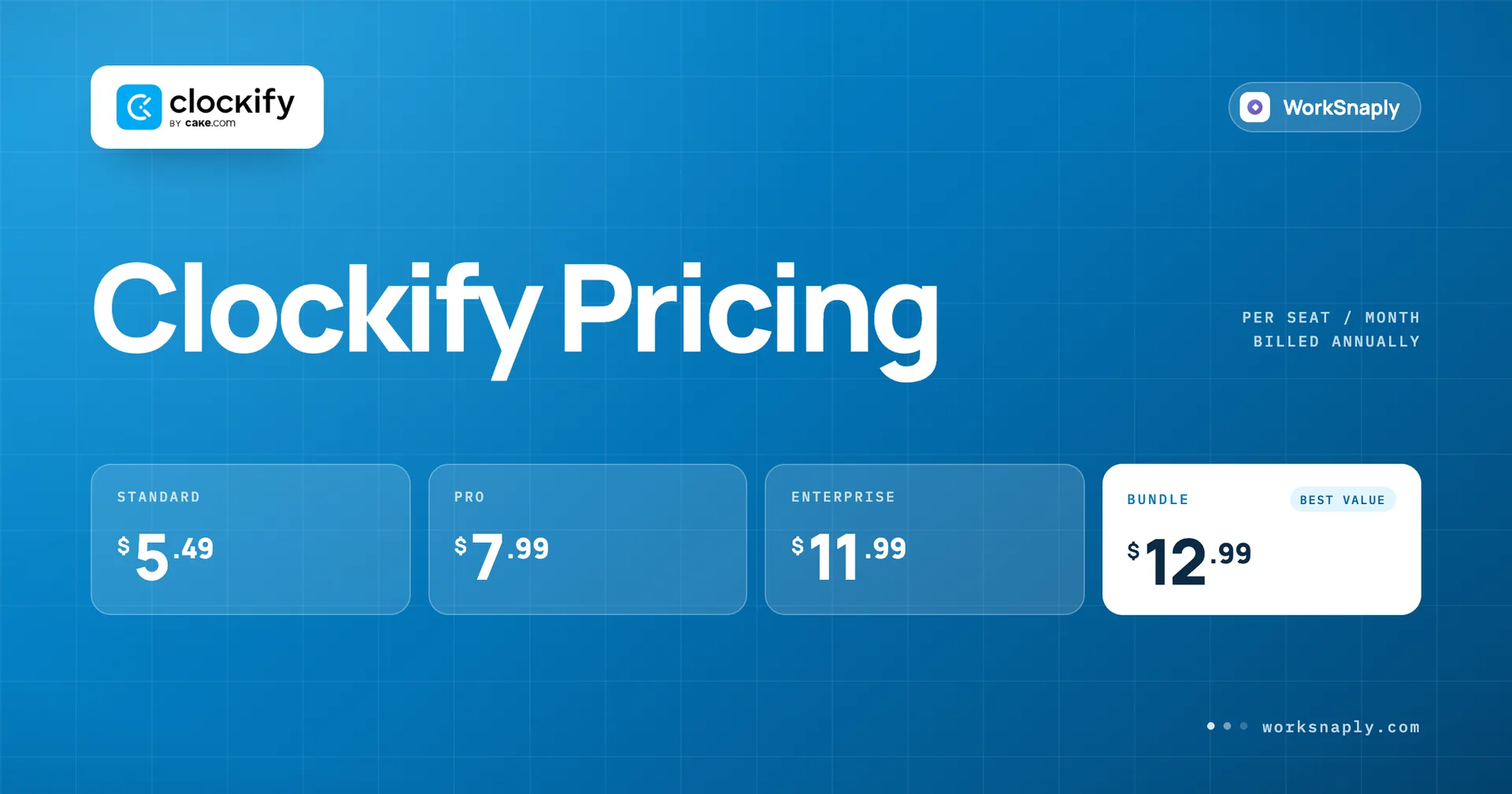
Clockify is free for 5 users, then $3.99 to $11.99 per user per month. See what each plan adds, what 10 to 50 seats cost a year and where monitoring begins.
Last updated: October 6, 2026. Prices checked October 2026.
Clockify is free for up to 5 users. Paid plans cost $3.99 for Basic, $5.49 for Standard, $7.99 for Pro and $11.99 for Enterprise per user per month on annual billing, or $4.99, $6.99, $9.99 and $14.99 billed monthly. Activity monitoring and GPS start on Pro. The CAKE.com Bundle is $12.99 annually.
Key takeaways
Clockify is free for up to 5 users with unlimited tracking, but the free plan limits exports to PDF, report ranges to one month and the API to 30 requests per hour.
Pro costs about twice Basic on annual billing ($7.99 against $3.99), and that is where activity monitoring and GPS begin.
Annual billing saves $12.00 per Basic seat and $36.00 per Enterprise seat over a year, which is about 20% on most tiers.
Invoicing, time approval and attendance sit on Standard at $5.49, so many teams never need Pro.
Clockify Pro costs $1.32 more per user than Time Doctor Basic, which includes monitoring at $6.67.
How much does Clockify cost per user in 2026?
From $0 on the free plan up to $14.99 per user per month on monthly Enterprise billing, with annual billing about 20% cheaper.
Plan | Monthly, per user | Annual, per user | Annual discount |
|---|---|---|---|
Free | $0 | $0 | Not applicable |
Basic | $4.99 | $3.99 | 20.0% |
Standard | $6.99 | $5.49 | 21.5% |
Pro | $9.99 | $7.99 | 20.0% |
Enterprise | $14.99 | $11.99 | 20.0% |
CAKE.com Bundle | $15.99 | $12.99 | 18.8% |
All prices are per user per month. The discount column is simple arithmetic: one minus the annual price divided by the monthly price.
Did you spot the bundle row? It is easy to miss, and we will explain what it adds below.
Is Clockify really free?
Yes for up to 5 users, and the free plan is more generous than most people expect, with a few limits worth knowing before you rely on it.
Unlimited tracking, unlimited projects and a team activity view
Auto tracker, idle detection and reminders, and a Pomodoro timer
Support through email, chat and phone, which the page lists on every plan
Public projects only, with no private projects
Now the limits. The comparison table on the pricing page shows PDF only exports, reports that cover up to one month, up to 3 webhooks and 30 API requests per hour on the free plan. Billable rates, kiosk and time audit are paid features too.
One more thing. The plan card and the comparison table say up to 5 users, but the FAQ on the same page says you can invite up to 4 people for free. Both can be true if the owner counts as the fifth person, but the page does not say that, so check at signup before you plan a team of five around it.
The cap still decides the cost. Illustrative example, assuming every seat is billed: 6 seats on Basic with annual billing cost 6 x $3.99 x 12 = $287.28 a year. That is still cheap, but it is a jump from nothing, so decide before you hire the sixth person which plan you will move to.
Working solo? Our guide to time tracking for freelancers covers what a one person setup actually needs.
What does each paid Clockify plan add?
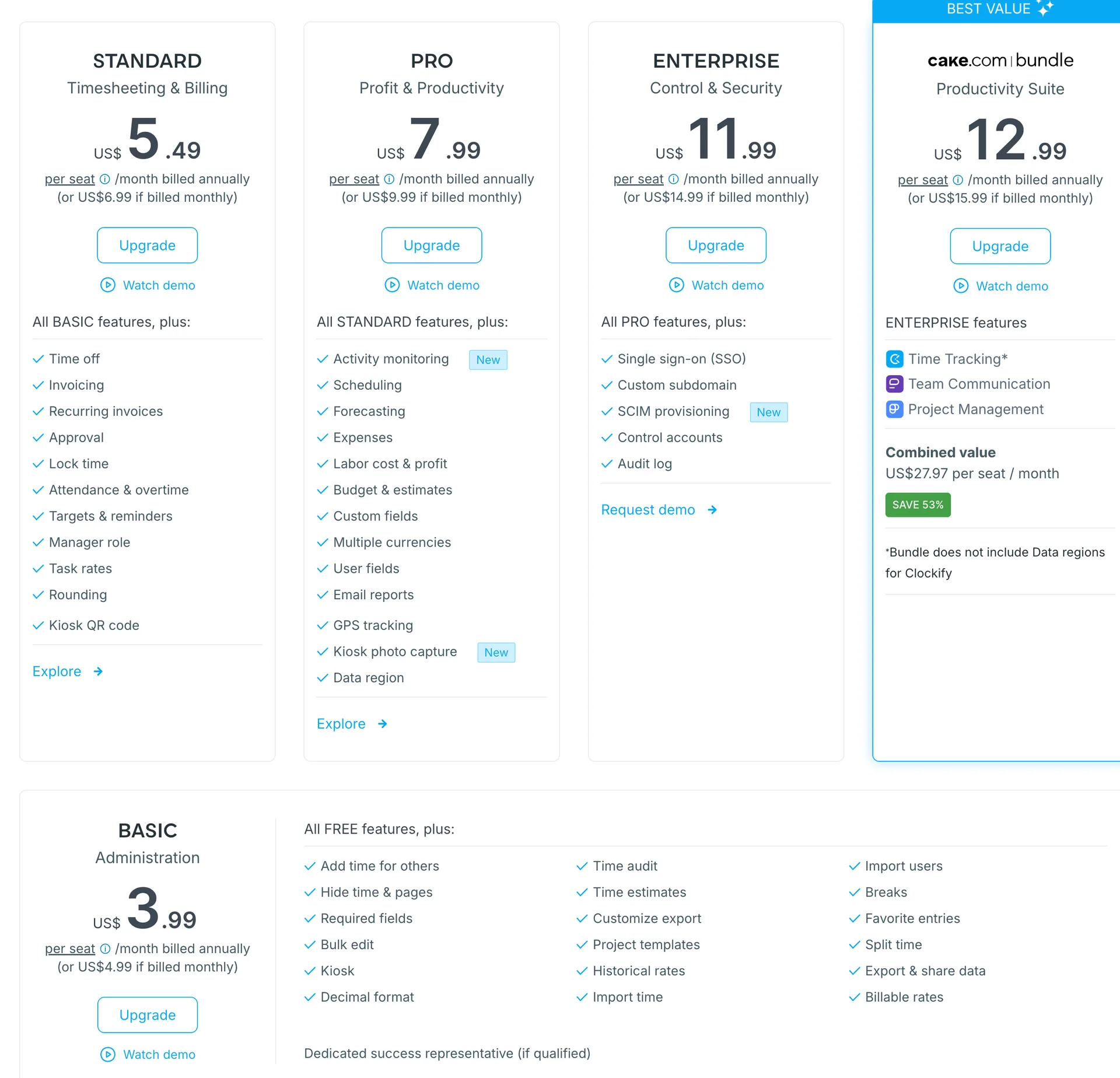
Each plan includes everything below it, and the real step changes are invoicing and approvals on Standard, then monitoring and budgeting on Pro.
Basic, $3.99 annually
Kiosk, PIN and breaks on both kiosk and web apps
Time audit and time estimate
CSV and Excel exports, shared and customized reports
Project templates, project management, billable rates and historic rates
Bulk edit, split time, import data and webhooks
Standard, $5.49 annually
Time off and attendance with overtime
Invoicing, recurring invoices and task rates
Time approval and locked timesheets
Time rounding, targets and reminders
Manager role and QuickBooks integration
Kiosk QR code and customized kiosk
Pro, $7.99 annually
Scheduling, forecasting and expenses
Labor cost and profit, budget and estimates
Activity monitoring, labeled New on the page, and GPS tracking
Kiosk photo capture and a data region setting
Multiple currencies, custom fields, user fields, alerts, force timer and email reports
Assignment and expense reports and recurring assignments
Enterprise, $11.99 annually
Single sign on and a custom subdomain
SCIM user provisioning, control accounts and an audit log
Two things to know about the labels. The pricing page lists the monitoring feature as Activity monitoring, and the Clockify help center lists Screenshots separately next to it on Pro. The page itself has no row called Screenshots, so if screenshots are the reason you are buying, confirm exactly what Pro captures during a trial.
Basic also lists a dedicated success representative if you qualify, and the page promises a free 30 minute onboarding session when you upgrade.
The CAKE.com Bundle at $12.99 annually is the fifth card. The page shows time tracking, team communication and project management in it, a combined value of US$27.97 per seat per month and a SAVE 53% badge. A footnote says the bundle does not include Data regions for Clockify. Does your team need three tools from one vendor, or just a tracker?
Why does Pro cost about twice Basic?
It is just how the prices fall: $7.99 is $3.99 plus $4.00, so Pro is 2.003 times Basic on annual billing.
The steps are uneven though. Standard is 38% more than Basic ($5.49 against $3.99), Pro is 46% more than Standard ($7.99 against $5.49), and Enterprise is 50% more than Pro ($11.99 against $7.99). The biggest single jump comes right where monitoring and budgeting start.
So here is the question to ask yourself. Which Pro feature do you actually need on day one, the monitoring, the GPS or the budgets? If the answer is none of them, Standard at $5.49 probably covers invoicing, approvals and attendance already.
What will 10, 25 and 50 seats cost in a year?
On annual billing, 10 seats cost between $478.80 on Basic and $1,438.80 on Enterprise, and 50 seats cost between $2,394.00 and $7,194.00.
Illustrative example: the formula is seats x annual price x 12, and the seat counts are chosen for the math.
Seats | Basic | Standard | Pro | Enterprise |
|---|---|---|---|---|
10 | $478.80 | $658.80 | $958.80 | $1,438.80 |
25 | $1,197.00 | $1,647.00 | $2,397.00 | $3,597.00 |
50 | $2,394.00 | $3,294.00 | $4,794.00 | $7,194.00 |
At 25 seats, choosing Pro over Standard adds $750.00 a year. That is the cost of turning monitoring on for the whole team, so make sure the whole team needs it.
How much does annual billing save?
Exactly $12.00 a year per Basic seat, $18.00 on Standard, $24.00 on Pro and $36.00 on Enterprise.
Plan | Twelve months, monthly billing | Twelve months, annual billing | Saved per seat |
|---|---|---|---|
Basic | $59.88 | $47.88 | $12.00 |
Standard | $83.88 | $65.88 | $18.00 |
Pro | $119.88 | $95.88 | $24.00 |
Enterprise | $179.88 | $143.88 | $36.00 |
For 10 Pro seats that is $240.00 a year, enough to cover a couple of extra seats. This post does not cover refund or cancellation terms, so check them before you pay for a year at once.
Where does Clockify pricing get tricky?
In four places: the monitoring paywall, the five user cap, the quiet bundle tier and the separate kiosk pricing.
Monitoring sits two tiers above the cheapest paid plan, so a team that wants it pays for scheduling, budgeting and forecasting as well. The cap pushes growing teams off the free plan whether or not they want extra features. The CAKE.com Bundle is a separate price that is easy to skip if you only read four tiers. And the page has a Kiosk pricing block marked Limited seats whose price sits behind a dropdown, so this post does not price kiosks. Ask Clockify if kiosks are central to your setup.
If monitoring is the main reason you are shopping, read our Time Doctor pricing breakdown next, because monitoring starts on its cheapest plan.
How does Clockify compare with Time Doctor, Hubstaff and WorkSnaply?
Clockify has the lowest entry price and the only free plan in this group, but monitoring costs more here than on three of its rivals.
Disclosure: we build WorkSnaply, so read our row with that in mind. Every price comes from the vendor pages listed in the Fact Check table.
Tool | Cheapest paid plan, annual | Monitoring starts at | Free option |
|---|---|---|---|
Clockify | $3.99 (Basic) | Pro, $7.99, listed as activity monitoring | Free plan, up to 5 users |
Time Doctor | $6.67 (Basic) | Basic, $6.67 | 14 day trial, no free plan |
Hubstaff | $4.99 (Starter) | Starter, $4.99, capped at 500 a month | 14 day trial |
WorkSnaply | $3.19 (Starter) | Professional, $6.39 | 14 day trial, no credit card |
WorkSnaply Starter is $0.80 below Clockify Basic, and Clockify has the free plan that we do not. Once monitoring matters, Time Doctor Basic is $1.32 below Clockify Pro and WorkSnaply Professional is $1.60 below it. See the full breakdowns of Time Doctor pricing and Hubstaff pricing, or WorkSnaply pricing on one page. Weighing Clockify against a different tracker? Our look at Toggl Track pricing and plans is a useful third data point.
Who should use Clockify, and who should look elsewhere?
Use it if you want a free or very cheap tracker with invoicing and approvals, and look elsewhere if you want monitoring at the lowest price.
Clockify fits you if
You have 5 or fewer people and want to pay nothing
You need invoicing, approvals and attendance without monitoring
You want the lowest paid entry price at $3.99
Look elsewhere if
You want monitoring at the cheapest possible tier
You want payroll inside the tracker, since the plan page does not list it
You prefer one vendor with a single, simple ladder
Still comparing options? Our roundup of the best employee time tracking software puts them side by side.
Related reading
Want to see another price next to Clockify?
WorkSnaply Starter is $3.19 per user per month on annual billing, and every plan has a 14 day free trial with no credit card.
Start free trialFrequently Asked Questions
How much does Clockify cost per user?
Clockify is free for up to 5 users. Paid plans cost $3.99 to $14.99 per user per month depending on the tier and billing, and the CAKE.com Bundle costs $12.99 to $15.99.
Does Clockify have a free plan?
Yes. The free plan covers up to 5 users with unlimited tracking and unlimited projects.
Which Clockify plan includes screenshots?
Activity monitoring and GPS tracking start on Pro, at $7.99 per user per month on annual billing. The Clockify help center also lists screenshots on Pro, but the pricing page has no separate row for them, so confirm during a trial.
How much does annual billing save on Clockify?
It saves $12.00 per Basic seat, $18.00 per Standard seat, $24.00 per Pro seat and $36.00 per Enterprise seat over a year.
Which plan has invoicing and time approval?
Both start on Standard, at $5.49 per user per month on annual billing.
What is the CAKE.com Bundle?
It is a tier at $12.99 per user per month on annual billing, or $15.99 monthly, that adds team communication and project management apps to Clockify. The page shows a combined value of US$27.97 and says the bundle does not include Data regions for Clockify.
Fact Check
Claim | Source | Exact text from source |
|---|---|---|
Standard, Pro, Enterprise and Bundle prices on the pricing page | Standard US$5.49 per seat /month billed annually (or US$6.99 if billed monthly). Pro US$7.99 per seat /month billed annually (or US$9.99 if billed monthly). Enterprise US$11.99 per seat /month billed annually (or US$14.99 if billed monthly). cake.com bundle US$12.99 per seat /month billed annually (or US$15.99 if billed monthly). Basic US$3.99 per seat /month billed annually (or US$4.99 if billed monthly). Free US$0 For up to 5 users. | |
Bundle value, discount badge and Data regions note | Time Tracking. Team Communication. Project Management. Combined value US$27.97 per seat / month. SAVE 53%. Bundle does not include Data regions for Clockify. | |
Pro card features and the New labels | All STANDARD features, plus: Activity monitoring New. Scheduling. Forecasting. Expenses. Labor cost & profit. Budget & estimates. Custom fields. Multiple currencies. User fields. Email reports. Alerts. Force timer. GPS tracking. Kiosk photo capture New. Data region. | |
Free plan limits in the comparison table | Clockify pricing page, Compare features across plans, screenshots taken October 2026 | Unlimited users: Up to 5 users. Clockify API: 30 requests per hour. Webhooks: Up to 3 webhooks. Export & share data: PDF only. Multi year range: Up to 1 month. Project access: Public projects. Multiple currencies: not included on Free, Basic or Standard. |
The free plan FAQ says 4 people | Are there any limits in the free plan? You can track as much time as you want and invite up to 4 people for free. We also offer support to everyone, regardless of their plan. If you need additional features, you can upgrade at any time. | |
Onboarding session, success representative and kiosk pricing | Upgrade and get a FREE 30 minute tailored onboarding session to help you get started! Dedicated success representative (if qualified). Kiosk pricing | Limited seats. | |
Activity monitoring and GPS start on Pro, no Screenshots row | Clockify pricing page, Compare features across plans, screenshots taken October 2026 | Productivity. Team activity. Auto tracker. Pomodoro timer. Idle detection & reminders. Activity monitoring: not included on Free, Basic or Standard, included on Pro and Enterprise. GPS tracking: not included on Free, Basic or Standard, included on Pro and Enterprise. |
Clockify prices by plan and the CAKE.com Bundle | Basic: Annual plan $3.99 per user per month. Monthly plan $4.99 per user per month. Standard: Annual plan $5.49 per user per month. Monthly plan $6.99 per user per month. Pro: Annual plan $7.99 per user per month. Monthly plan $9.99 per user per month. Enterprise: Annual plan $11.99 per user per month. Monthly plan $14.99 per user per month. CAKE.com Bundle: Annual plan $12.99 per user per month. Monthly plan $15.99 per user per month. | |
Free plan features and the 5 user limit | Free plan features: Unlimited tracking. Up to 5 users. Unlimited projects. Export reports (PDF). Multiple currencies. Apps and time tracking integrations (excluding QuickBooks). Support. API. | |
Basic plan features | Basic plan features: All FREE features. Kiosk. Add time for others. Hide time and pages. Required fields. Bulk edit. Decimal format. Time audit. Time estimate. Export reports (CSV, Excel). Share reports. Customize reports. Project templates. Project management. Billable rates. Historic rates. Import data. PIN. Breaks on kiosk app. Breaks on web app. Favorite entries. Split time. Webhooks. | |
Standard and Pro plan features, including screenshots, GPS and activity monitoring | Standard plan features: All BASIC features. Time off. Invoicing. Time approval. Lock timesheets. Targets & reminders. Manager role. Task rates. Time rounding. QuickBooks integration. Customize kiosk. Attendance & overtime. Pro plan features: All STANDARD features. Scheduling. Expenses. Labor cost and profit. Budget and estimates. Custom fields. User fields. Email reports. Assignment report. Alerts. Force timer. GPS tracking. Screenshots. Forecasting. Data regions. Assign currency to client. Activity monitoring. | |
Enterprise features and the bundle benefits | Enterprise plan features: All PRO features. Single sign on (SSO). Custom subdomain. Control accounts. Audit log. CAKE.com Bundle benefits include Pumble [team communication app] and Plaky [project management app]. | |
Time Doctor Basic price and screenshots on Basic | Basic: Annual $6.67/user/month | Monthly $8.00/user/month. Standard: Annual $11.67 | Monthly $14.00. Premium: Annual $16.70 | Monthly $20.00. Basic features: Automatic tracking, Projects and Tasks, Timeline Report, Screenshots, Online / Offline Tracking, Knowledge Base, Groups / Teams. | |
Hubstaff prices | Annual (2 months free): Starter $4.99 / seat / mo, 2 seat minimum. Grow $7.50 / seat / mo, 2 seat minimum. Team $10 / seat / mo, 2 seat minimum. Enterprise $25 / seat / mo, Billed annually. Monthly: Starter $7 / seat / mo, Grow $9 / seat / mo, Team $12 / seat / mo, Enterprise $25 / seat / mo, Billed annually. | |
Hubstaff screenshot cap on Starter | Starter: 500 screenshots/user/month, 500 Apps/user/month and 500 URLs/user/month. Grow: 1500 screenshots/user/month. Team: unlimited screenshots and app and URL tracking, Payments and payroll. | |
WorkSnaply prices, features and trial | Starter $3.99 per user/month monthly, $3.19 annual, 1 user minimum. Professional $7.99 monthly, $6.39 annual, No minimum, Screenshots & activity monitoring. Enterprise $18.99 monthly, $15.19 annual, No minimum, Payroll. All plans include a 14 day free trial with no credit card required. Save 20% with annual billing on all plans. | |
Computed figures | Arithmetic on the prices listed above. Illustrative examples assume 10 seats, annual billing and a 12 month year. | Not a quote from a vendor. Formula shown in the post. |